Kanban for Teams: The Complete Guide
By Sambhav Aggarwal · Founder & Project Strategist at Otper. Founded Otper in 2026. Expert in lean operational workflows and team accountability.
TL;DR
One shared board, a single owner on every card, a WIP limit on every column. The numbers a manager asks for are already on it, so the status meeting gets deleted.
Work sits in a chat thread, two spreadsheets and somebody's head, and its status lives in a Wednesday meeting. McKinsey found interaction workers spend 28% of the work week managing email and 19% searching for information - operational drag, before anyone ships anything. Kanban for teams is the fix.
What Kanban is, in two minutes
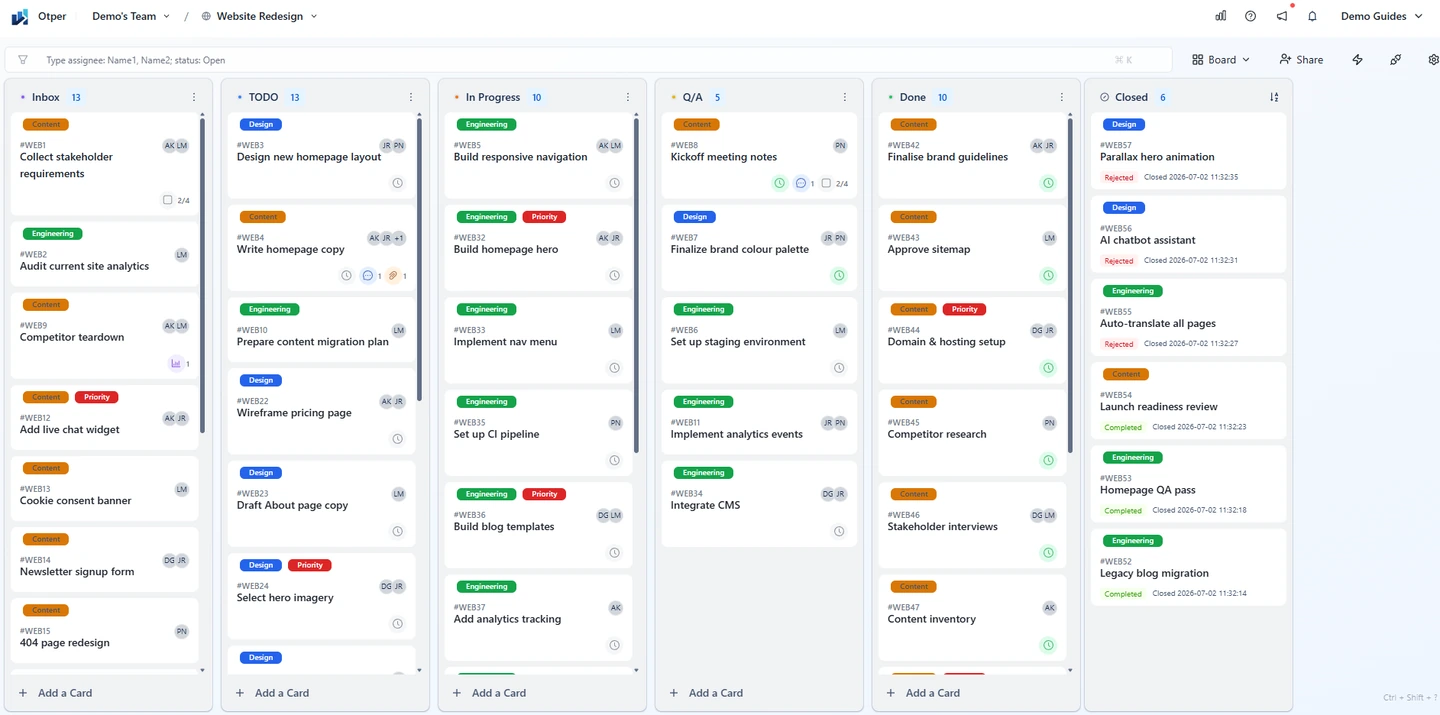
A Kanban board is columns, cards and a limit. Each column is a stage of your workflow - Backlog, In Progress, Review, Done. Each card is one piece of work, moving left to right as it progresses. Nothing else is required to call it Kanban.
Two habits make it work. Pull, not push: people take the next card when they have capacity, instead of work being assigned onto an already-full plate. Limit work in progress: cap how many cards a column holds at once, so the board shows where work is piling up instead of hiding it behind everyone looking "busy."
That is the whole method - no sprints, no fixed-length iterations, no ceremony. Work flows continuously; the board is the plan. See every Kanban board capability, or keep reading for what changes when the board is shared by a team instead of one person.
Kanban for teams, not for individuals
What changes when kanban boards are shared is not the columns - it is who the board answers to. A teams kanban board is an agreement about how work moves between people.
- One board, one source of truth: every piece of work sits in one place. That is what makes kanban for project management work at team scale.
- Work is pulled, not pushed: people take the next card when they have capacity.
- The board replaces the status update: if a card moved, the update happened.
These are kanban boards for a team, not a board inside a chat app.
Why task lists fail teams
A task list fails where a kanban board for project management earns its keep: when work moves between people. A list shows what exists. It hides what is in flight, who owns it, and which stage has stopped draining. Status is assembled by hand.
Kanban vs Scrum vs task lists - which one, when
These solve different problems, not competing versions of the same one.
- A task list works alone. One person, one backlog, no handoffs to track. It stops working the moment a second person depends on the outcome.
- Kanban is continuous flow: work arrives whenever it arrives, moves through columns, and ships whenever it is done. No fixed cycle length. It fits support queues, marketing requests, client work and any team whose intake is unpredictable.
- Scrum is fixed-length iterations - a sprint, a planning ceremony, a defined scope committed up front. It fits teams shipping a release on a cadence, where scope can be locked for two weeks at a time.
| Kanban | Scrum | Task list | |
|---|---|---|---|
| Cadence | Continuous flow, no fixed cycle | Fixed-length sprints, usually 1-4 weeks | None |
| Roles | None prescribed - one named owner per card | Product Owner, Scrum Master, dev team | None - one person's list |
| Best for | Unpredictable intake: support, marketing, client work | Release-driven work with lockable scope | Solo work, no handoffs |
The practical test: if you can name what ships in exactly two weeks before the two weeks start, Scrum's structure earns its overhead. If intake is constant and priorities shift mid-week, that structure becomes something to work around - Kanban's continuous pull is the better fit, which is why it is the default for most 5-person teams doing support, marketing or ops work.
The 5 rules of a shared board
- One card, one outcome: not one project, not one person's day.
- One card, one named owner: helpers may be assignees, co-owners may not.
- Every column has a WIP limit: including Review, where unfinished work collects.
- Blocked cards get flagged, not buried: a label on the card face, never a comment twelve deep.
- The board is updated before the review, never during it.
Rules one, two and five are conventions, not settings. The board makes breaking them visible.
Designing columns for your team
Columns should match how work actually moves through your team, not a generic template. Start from what happens between "not started" and "done," and name every stage where work waits on a person or a decision.
Dev teams
Backlog · Ready · In Progress · Review · Done. Review is its own column because code review is where work queues waiting on someone else.
Agency and client-service teams
Requests · In Progress · Client Review · Delivered. Client Review is separate from internal Review - the two have different WIP limits and different owners watching them.
Marketing teams
Ideas · Briefed · In Production · Review · Published. Briefed exists because an idea and a ready-to-start asset are not the same thing.
The step-by-step Kanban board setup guide walks through building any of these column sets from scratch.
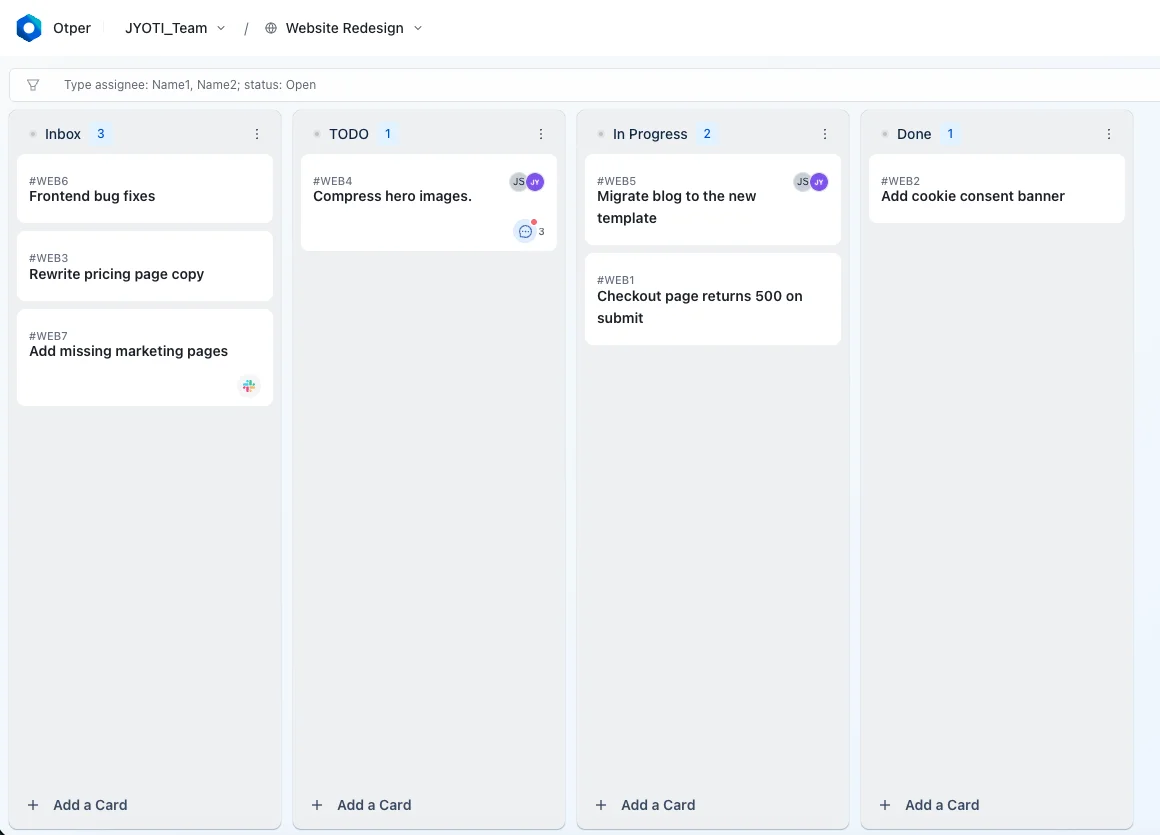
How to set up kanban for teams in 20 minutes
- Define your columns: Backlog · Ready · In Progress · Review · Done. Ready is the column teams skip, and the one that makes pull work.
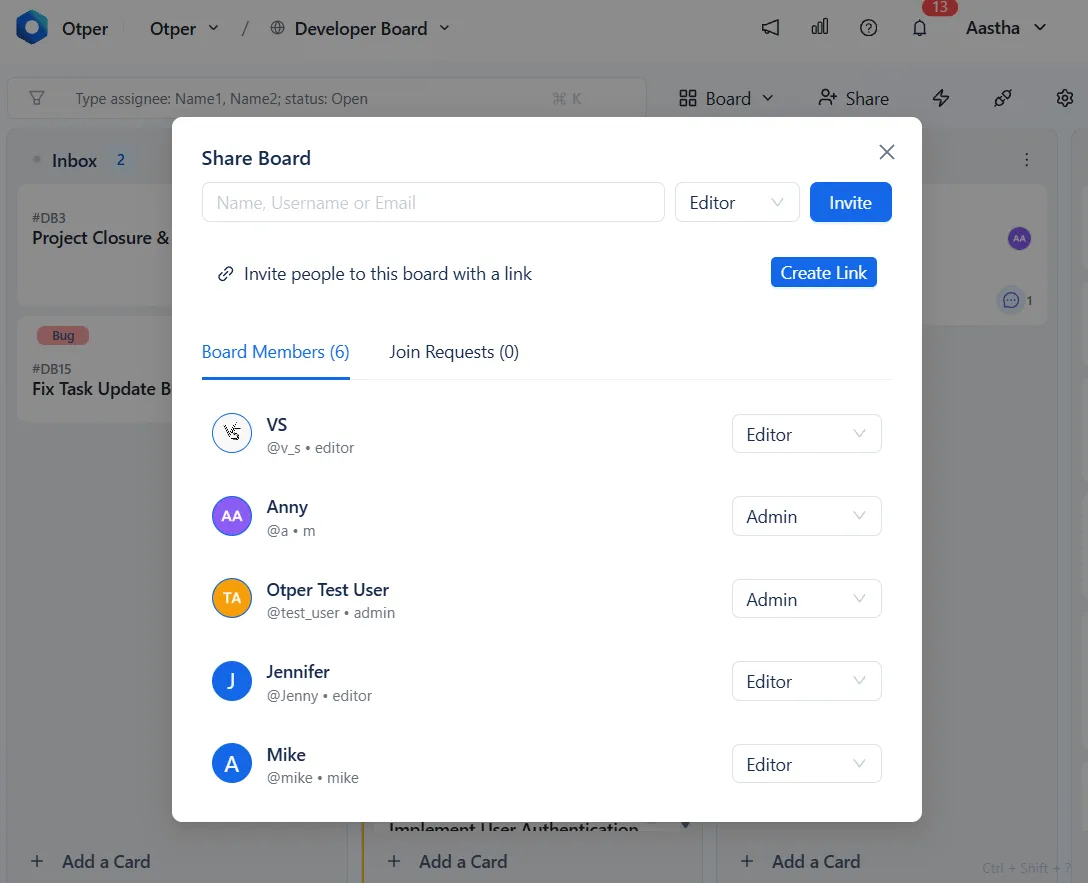
- Set a WIP limit on every column - soft warns, hard refuses.
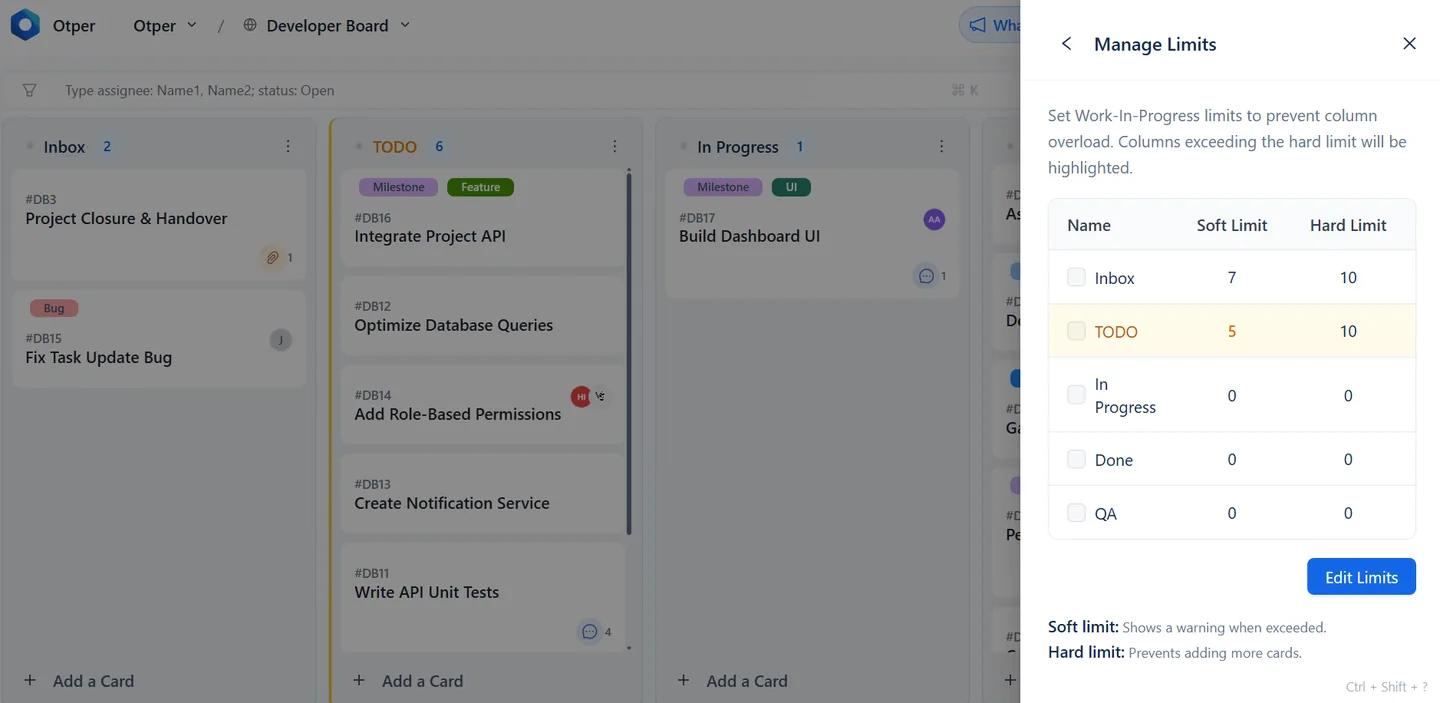
- Assign one owner per card - assignable people are board members, so add the team first.
- Add a Blocked label, then automate it in a waiting stage.
- Set the board cadence for updates and reviews. Dated work also draws itself on the Gantt view.
- Turn on delivery reporting - open Reports and scope it to your boards. Team and board admins can read it.
For the field-by-field walkthrough of each setting, the board setup guide covers every option this summary skips.
WIP limits your team will actually keep
Otper's recommended starting point, not an industry law:
- Per person: 2 cards in progress, never 3.
- Per column: active members × 1.5, rounded down.
- Review column: half the In Progress limit.
| Active members | In Progress limit | Review limit |
|---|---|---|
| 3 | 4 | 2 |
| 5 | 7 | 3 |
| 8 | 12 | 6 |
A limit that does nothing is decoration. Past the soft limit the column turns amber - a warning, nothing blocked. At the hard limit it turns red and refuses the card until something leaves. Set soft at capacity, hard one above. The stage that stays amber is your bottleneck detection.
Ownership: the rule that ends "I thought you had it"
Every card gets one named owner, accountable for moving it, not for doing all the work. Helpers join as assignees. What you remove is the card with two equal names.
When a card ages, escalate in order. Owner first: what is it waiting on? Then the board: one card, or a column-wide queue? Then the manager, deciding a pattern, not refereeing a handoff.
This is where team accountability stops depending on memory: a card keeps a contributor history of who owned it and when they handed it on.
Automations: what to automate, what to leave manual
Automate the mechanical steps. Leave the judgment calls to a person.
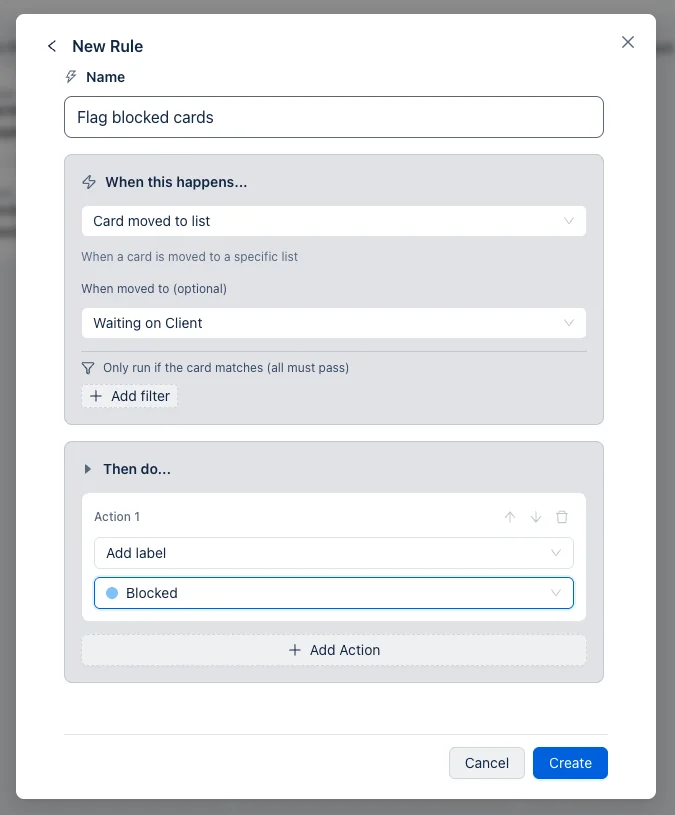
Automations run on a trigger and an action: a card is created, moved to a list, assigned, labeled, or its due date arrives - and in response, Otper can move the card, add or remove a label, assign or unassign someone, set or complete a due date, post a comment, or close the card. Chain a few of these and the board maintains itself:
- Card enters "Waiting on Client" → automatically add the Blocked label.
- Blocked label removed → automatically move the card back into the active column.
- Due date reached and the card is not in Done → post a comment flagging it, so it surfaces without anyone checking manually.
What to leave alone: who owns a card, whether it is actually finished, and anything requiring a judgment call rather than a rule. Automating those just hides a decision nobody made. The automation deep dive covers the full action list and worked examples.
Remote and async teams: handoffs, time zones, mobile
A shared board is what makes async work possible in the first place - the alternative is waiting for someone to wake up and read a message. Three things carry a handoff across a time-zone gap without a live conversation:
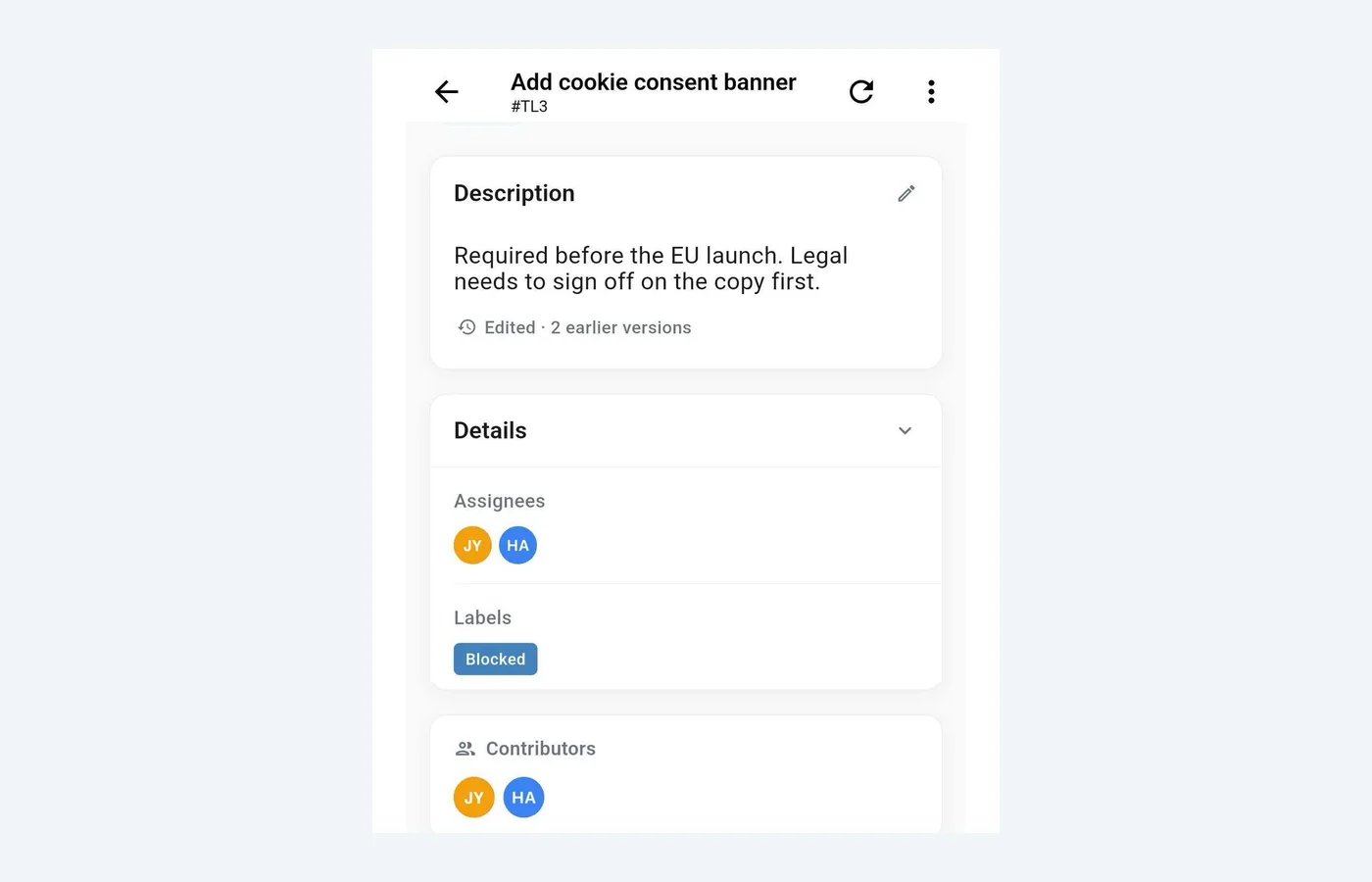
- Contributor history: a card keeps a record of who owned it and when they handed it on, so the next person picking it up does not have to ask.
- The Blocked label: it survives the handoff. Whoever opens the board next sees exactly what is stuck, without a message explaining it.
- The mobile app: check and update cards from wherever the workday happens, instead of a status update waiting for a laptop.
Ownership matters more, not less, on a distributed team - see clear ownership for remote teams and managing projects from the mobile app.
Replacing the status meeting with a board review
Fifteen minutes, twice a week, async. One person reads the board and answers three questions:
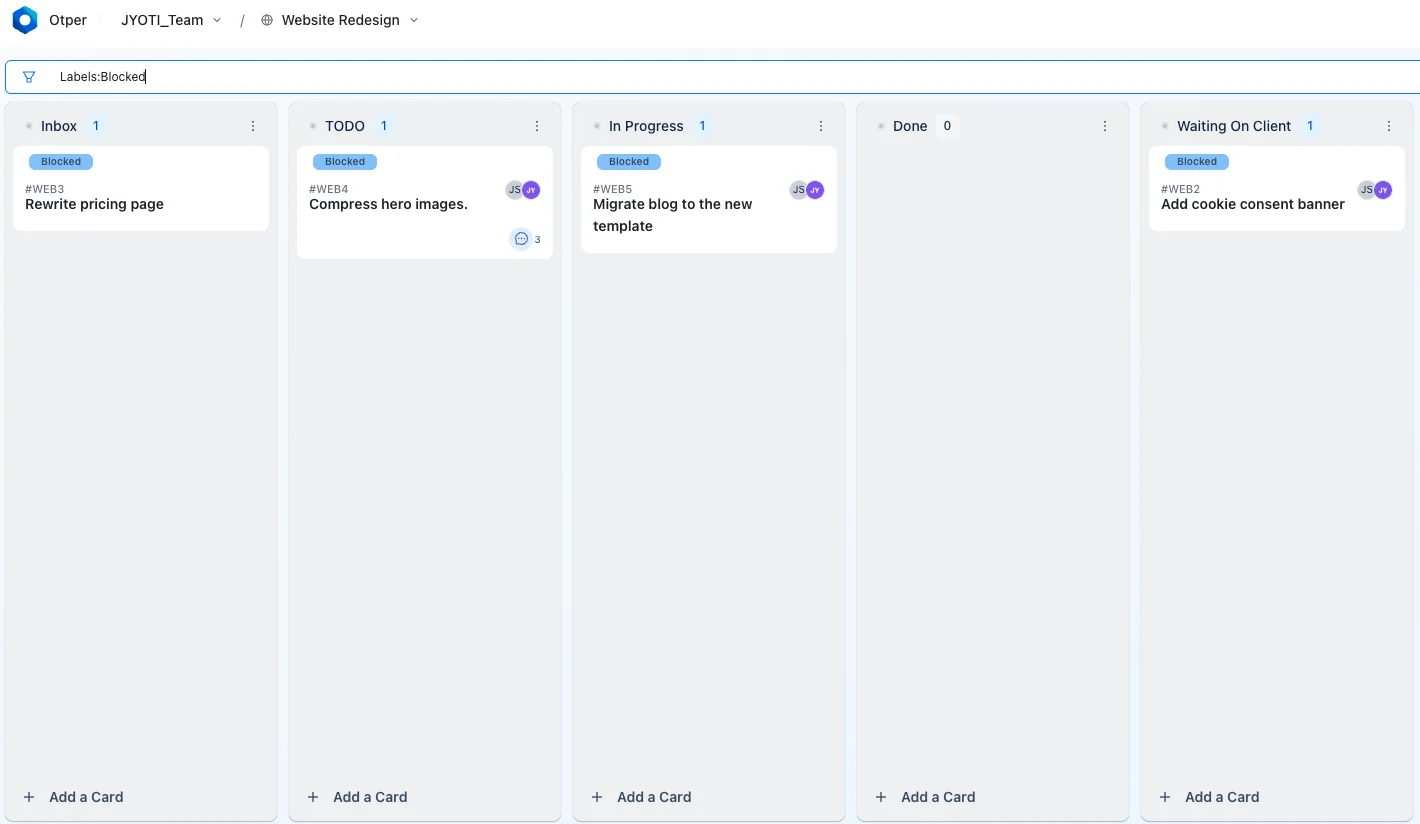
- What is blocked? Filter the Blocked label. Each one needs a name and a next action.
- What is over its WIP limit? Any amber or red column. Nothing new enters until it drains.
- What is ageing? No card activity for seven days, flagged as stuck.
If the board answers those three, the meeting is deleted, not shortened. Keep one for decisions that need argument.
The 4 metrics a team board must show
- Throughput: cards created vs completed per period. Act when created outruns completed two periods running.
- Median completion days: how long cards take end to end. Act when the median climbs while throughput stays flat.
- Stage bottleneck: average days per list, ranked and scored. Act when a stage scores critical.
- Stuck cards: no activity for seven days or more. Act when the count is above zero.
All four come from activity your team already produces - delivery reporting with nothing to maintain: pick a range, scope it, export to CSV or PDF. Together they are how you spot a slipping project before the deadline.
Common mistakes
- Too many columns. Past seven or eight, the board stops being scannable and starts being a form nobody fills in - every extra column is one more state someone has to remember to update. Fix: fold any column that isn't a real decision point into its neighbour, and stay at five to seven.
- No Ready column. Without it, "In Progress" fills with work that was pulled too early - half-briefed, missing a dependency, not actually startable. Pull stops meaning anything once people are pulling from a pile of maybes. Fix: add Ready as a holding stage, and treat "not ready" as a reason a card cannot move, not a detail to sort out later.
- Shared ownership. Two names on a card is the same as none - neither one moves first, each assumes the other has it, and it surfaces during the review as "I thought you had it." Fix: name one accountable owner when the card is created, not after it has stalled; everyone else is an assignee or contributor.
- WIP limits set as decoration. A number on a column header that nothing enforces changes nothing - the column fills anyway and the number becomes wallpaper. Fix: set the hard limit, not just the soft one. Soft warns; only hard actually refuses the card.
- Updating the board during the review. The review is for reading the board, not populating it - if people are still typing status when the review starts, the fifteen minutes just became a status meeting with extra steps. Fix: set a cutoff before the review. Anything not updated by then is stale, not current, and gets flagged as such.
- No Blocked label. Blocked work hides in a comment thread instead of showing on the card face, so the only way to find it is to already know where to look. Fix: create the label once, automate it onto whatever "waiting" column you have, and filter by it every review.
- An unlimited Review column. Without a cap it becomes a second backlog - work "in review" for weeks is work that is actually stalled, just with a more comfortable-sounding column name. Fix: cap Review the same as any other column, and set it lower than In Progress since review should move faster than production.
- Automating the judgment calls. Rules should move labels and cards, not decide who owns something or whether it is done - an automation that closes a card on a timer just hides an unmade decision instead of surfacing it. Fix: keep automation to the mechanical steps - moves, labels, dates, comments - and leave ownership and "done" to a person.
Quick starts by team type
Same five rules, different columns. Pick the closest fit and adjust from there.
Dev teams
Backlog · Ready · In Progress · Review · Done. WIP limit In Progress at roughly two cards per engineer; cap Review separately so code review does not silently become the bottleneck.
Agency teams
Requests · In Progress · Client Review · Delivered. Every request gets an owner on intake, not once work starts - see how other service and agency teams run delivery on a shared board.
Marketing teams
Ideas · Briefed · In Production · Review · Published. Cap In Production tightly - marketing boards drown in half-started campaigns faster than any other team type. More in Kanban boards for marketing teams.
Ops and support teams
Inbox · Triaged · In Progress · Waiting on Customer · Resolved. Waiting on Customer is its own column so paused work does not count against the team's WIP limit.
Kanban board software for teams: what to check before you buy
| Tool | Free tier | Paid from | Native WIP limits | Ownership | Reporting |
|---|---|---|---|---|---|
| Otper | $0 - 3 teammates | $12/user/mo | Soft + hard, per list | Assignees + contributor history | Built in |
| Trello | 10 boards/workspace | $6/user/mo ($5 billed annually) | Via add-on | Members | Via add-on |
| Jira | Up to 10 users | $9.05/user/mo | Native | Single assignee | Built in |
| ClickUp | Free plan | $10/user/mo ($7 billed annually) | Native | Assignees | Dashboard build |
| Asana | Up to 10 users | $13.49/user/mo ($10.99 billed annually) | Not native | Single assignee | Higher tiers |
| monday.com | Up to 2 seats | $9/seat/mo | Not native | People column | Higher tiers |
Pricing checked 16 September 2026 (Trello, Jira, ClickUp, Asana); monday.com has a 3-seat paid minimum and was not independently re-verified this update.
Five criteria worth more than a feature count in any kanban board program:
- Does a WIP limit stop the card? A number on a column header changes nothing.
- Is ownership readable from the board? Opening a card to find the owner means the board is not reporting.
- Does reporting exist before you configure it? A kanban project management tool that needs a dashboard built first will not get one.
- Is the free tier big enough for a pilot? Free kanban software only helps if a whole small team fits.
- How long to the first useful number? Measure setup to first report, not first card.
See full side-by-side comparisons, including published pricing and where each tool fits better, on the tool comparison hub.
Board design by team size: 2-5 vs 5-15 people
The right board depends on how many people pass work between them. The risk changes with headcount, so the columns should too.
2-5 people
Three columns are enough: Ready · Doing · Done. Handoffs are few and everyone can see the whole board in one glance. The real risk is concentration: one person quietly carrying most of the work while the board still looks healthy. Check how many cards each person holds, not just how many are in Doing.
5-15 people
Add a review stage, such as Ready for Review or Client Review. With more people the risk moves to invisible handoffs: work that is "done" for its maker but waiting on someone who does not know it has arrived. A review column turns that wait into a place on the board with its own WIP limit.
Beyond about 15
One shared board stops being readable. Split into a board per team, and give someone the job of owning the process itself: the columns, the limits and the review cadence. This guide is written for teams of 2-15. Past that size the rules here still hold for each board, but they are not enough on their own without that process owner.
The one-owner rule (why "the team" owns nothing)
Every card should have exactly one named owner before it leaves the backlog. Put five people on a shared card and each of them quietly assumes someone else will handle it. A single name settles who moves the card forward, and who hands it back, without drama, when priorities or life get in the way.
This is a team rule, not a setting: Otper lets cards sit unassigned, because intake rarely knows who will pick something up. To keep the rule, add an automation that assigns an owner when a card moves into Ready, or turn on a list's daily reminder for unassigned cards. When the owner changes, the card's contributor history records the handoff.
The 7-day amber rule for stale work
Any card with no activity for seven days gets flagged. Treat that flag as amber, not red: it is there for visibility, not blame. A quiet card is usually waiting on a person who does not know it is waiting on them.
In Otper, Reports lists these as Stuck Cards: every open card with no activity for seven days or more, with its owner, its column and how long it has been idle. (On the board itself, amber means something else: a column over its soft WIP limit.)
Once a week, take 15 minutes to review only the stale cards, and ask three questions of each: is it still worth doing, does it have the right owner, or should it be closed? Closing a card is a legitimate outcome. A board that never drops work ends up as a backlog with columns.
A 15-minute Friday triage replaces the status meeting
The weekly status meeting exists to find out what is not moving. The board can already tell you, so replace the meeting with a short review of only that.
- Open the stuck list. Only cards idle for seven days or more. Everything that moved this week needs no discussion.
- Decide each one in under a minute: keep it, reassign it, or close it. Write the decision on the card as a comment.
- Glance at throughput. If created outran completed again this week, intake is outpacing the team. That is worth raising.
Friday works because the week's movement is already on the board and next week has not started. Fifteen minutes, one person driving, owners joining only for their own cards. The numbers come from delivery reporting, so nobody prepares anything beforehand.
FAQ
How do you use Kanban for teams?
One shared board, one owner per card, a cap on every column. People pull the next card when they have capacity, so status needs no reporting.
How many WIP limits should a team have?
One on every column, not just In Progress. Start with two cards in progress per person, a per-column cap of active members × 1.5 rounded down, and Review at half the In Progress limit.
Can a Kanban board replace status meetings?
Yes, if it answers what is blocked, what is over limit and what is ageing. When nobody has to assemble those, the meeting is deleted.
How do you assign ownership on a Kanban board?
Assign one member as the accountable owner on the card, so responsibility is readable from the board rather than remembered.
What is the difference between Kanban for teams and a task list?
A list shows what exists. A board shows where each item is, who has it, and caps what is in flight.
Does every card need an owner?
Not by force - cards can be created unassigned. It is a team convention this guide recommends, not a setting that blocks the card.
Kanban or Scrum for a small team?
Kanban for continuous, reactive work with no fixed release cycle. Scrum for work that ships in planned, fixed-length iterations. Most 5-person teams doing support, marketing or ops work fit Kanban.
Is a kanban board enough for a small team's whole project?
For teams of 2-15, usually yes. The columns mirror the real workflow. Boards struggle only when ownership is ambiguous or when work goes stale without anyone noticing.
How many columns should a small team's board have?
Three for teams of five or fewer. Four to five, including a review column, once the team grows past five people.
Should a card ever belong to "the team"?
No. Keep exactly one named owner on every card. Collaborators comment, and the owner moves the card.
When should we add kanban reports?
Once the board has two to three weeks of live data. At that point a weekly check of throughput and stuck cards can replace the status meeting.
Keep reading
- Kanban board setup, step by step
- Reduce status-meeting time
- Clear ownership for remote teams
- Workflow automation that saves time
- Managing projects from the mobile app
- Kanban analytics: bottlenecks and workload
- Atlassian's Kanban guide
Try this workflow free in Otper
One board, one owner per card, WIP limits on every column. Free for up to 3 teammates.
Get started free