Kanban Metrics & Reporting: The Complete Guide
By Sambhav Aggarwal · Founder & Project Strategist at Otper. Founded Otper in 2026. Expert in lean operational workflows and team accountability.
TL;DR
A Kanban board shows what is happening. Kanban analytics - throughput, completion time, bottlenecks, stuck cards, and workload - show what is going wrong, and why, while there is still time to act. All of it is built into Otper's reporting from board activity you already generate; nothing to configure first.
A Kanban board shows what is happening. Kanban analytics show what is going wrong, and why, while there is still time to act. If you already run boards, the data they produce can warn you about problems days or weeks before a deadline is missed. This guide covers every lens Otper's reporting gives you: the core flow metrics, bottlenecks, time-in-stage, stuck tasks, overdue and at-risk work, workload, throughput, due-date patterns, board comparison, and how to turn all of it into a report nobody has to assemble by hand.
New to boards? Start with how to set up a Kanban board, then come back - good analytics depend on cards that have owners, due dates, and labels.
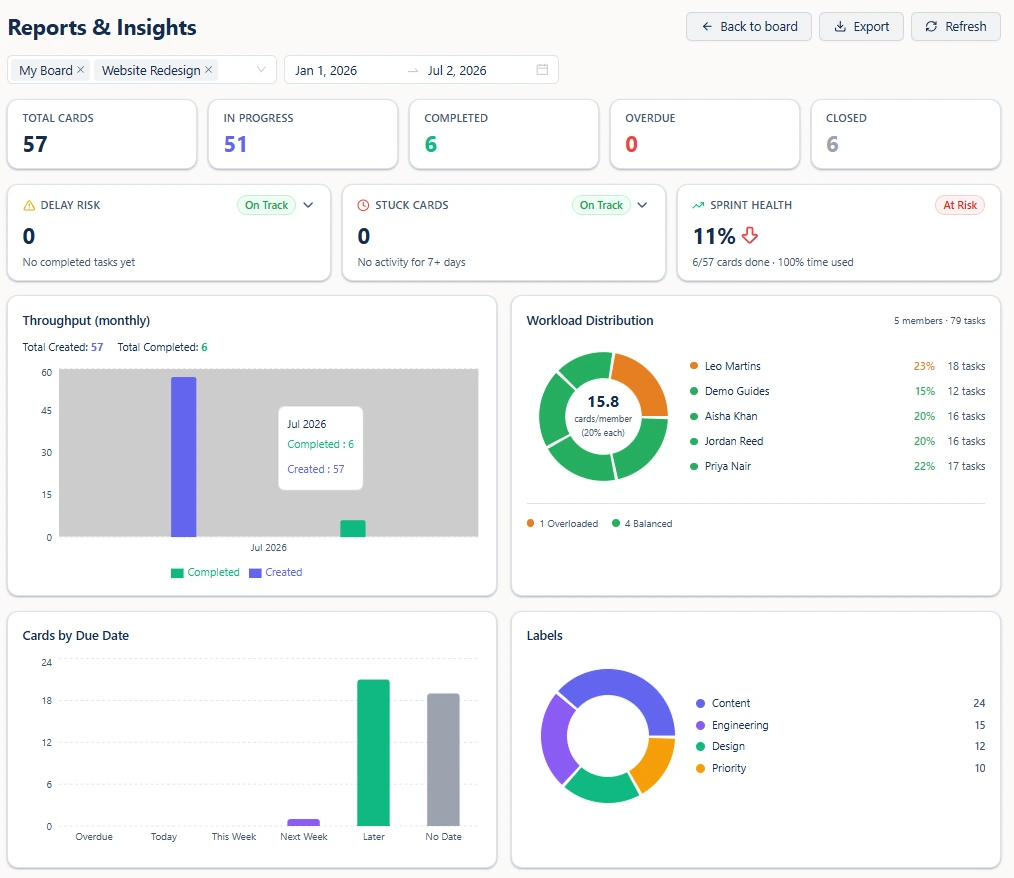
| Metric | What it tells you | Warning sign | First action |
|---|---|---|---|
| Throughput | Cards created vs. completed per period | Created consistently outruns completed | Check bottlenecks and workload before adding more intake |
| Delay Risk | Median completion time, and which open cards are trending late | At-risk count climbing | Open the at-risk list, find what's blocking the oldest cards |
| List Bottlenecks | Average days cards spend in each stage, scored | A stage scores "critical" | Add capacity to that stage, or split it into smaller steps |
| Stuck Cards | Cards with no activity for 7+ days | Stuck count above zero | Ask the owner what's blocking it, or close it if it's abandoned |
| Workload Distribution | Each person's share of active work vs. the team average | Someone flagged "overloaded" or "critical" | Reassign using the suggested rebalance |
| Sprint Health | Completion rate vs. time elapsed for your selected date range | Status flips to "at risk" | Check which cards are behind pace, and why |
The 4 core flow metrics
These four terms show up in every Kanban discussion. Here is what each one means, and - precisely - what Otper actually reports for it.
Throughput
How many cards were completed in a period. The only one of the four that's purely a count, not a duration. Otper reports this as created-vs-completed per day, week, or month, so you can see whether finishing is keeping pace with intake.
Lead time
The full span from when a card is created to when it's done - including however long it sat untouched before anyone started it. This is what Otper's median completion time measures: the median days between a card's creation and its close, surfaced in the Delay Risk view.
Cycle time
The narrower span from when work actually starts to when it's done - backlog wait excluded. A useful concept, and worth knowing when you read about Kanban elsewhere, but Otper does not report it as a separate number from lead time. If most of your cards start moving the day they're created, the two are close anyway.
WIP (work in progress)
Two different things share this name, and it's worth keeping them apart. WIP limits are a board setting - a cap per column that a hard limit actually enforces. "Work in progress" in Reports is simpler: a live count of how many cards are open right now, so you can see load instead of inferring it. Reports shows the count; it does not show limit breaches - those surface as a notification and a red column on the board itself.
No benchmark number is honest here - a good completion time depends on how many stages your board has and how big your cards are. Track your own trend instead of chasing an outside target.
Bottlenecks: where work quietly gets stuck
What it is: the stage that limits how fast everything else can move, measured by the average number of days cards spend there before moving on.
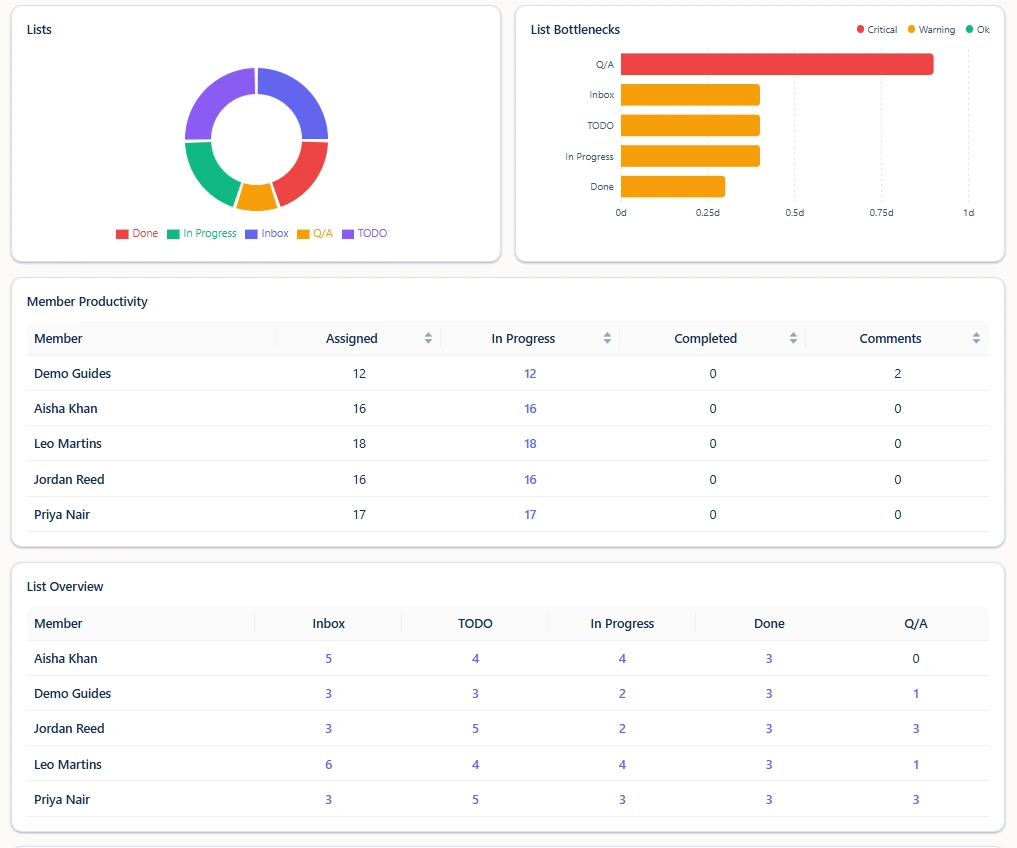
How to read it: the symptom is simple - cards accumulate in one list, often Review or QA, while earlier stages keep feeding it. On a busy board this is easy to miss day to day, which is why Otper's List Bottlenecks view scores every list automatically: a score above 0.6 of the slowest list's average is flagged critical, above 0.3 is a warning, everything else is fine.
When to act: the moment a stage scores critical, or scores warning for two weeks running. A single slow week can be noise; a stage that stays slow is your constraint.
What to do: once you can see it, the fix is usually one of three - move people to the clogged stage, add a WIP limit upstream so it stops overfilling, or split the stage into smaller steps. A list breakdown in your reporting makes this concrete rather than anecdotal. If the bottleneck keeps moving around instead of settling in one place, it's often worth revisiting how your lists are set up - a stage that's really two steps crammed into one will always look like a bottleneck.
Time-in-stage: measuring how long cards sit in each list
What it is: the raw data underneath the bottleneck score - how many days, on average, a card spends in each individual list before it moves to the next one.
How to read it: Otper builds this from the timestamps on every card move - the moment a card enters a list to the moment it leaves. A card that's never moved counts too, measured from creation to now, so a quiet card doesn't hide from the number just because nobody's touched it.
When to act: when one list's average climbs well above the others on the same board - that gap is the useful signal, more than any absolute number.
What to do: compare time-in-stage across your Kanban board's lists side by side rather than in isolation. A Review stage that averages three days isn't a problem by itself - it's only a problem relative to how long the stages around it take.
Stuck tasks: work that has gone quiet
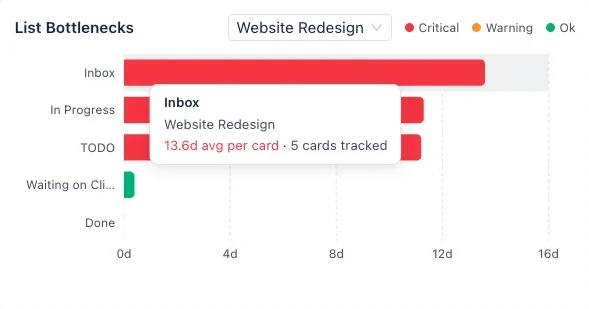
What it is: cards with no logged activity - no move, comment, or edit - for seven or more days.
How to read it: not every risk is overdue yet. Some cards simply stop moving or stop receiving meaningful updates, and a due date in the future won't catch that. Stuck-task detection is a separate signal from Delay Risk for exactly this reason.
When to act: as soon as the stuck count is above zero - the seven-day threshold is already a generous grace period before something counts as quiet.
What to do: ask what is blocked, clarify the next step, or close the card if the work is no longer active. You can also catch this automatically - an automation can scan weekly for stale cards and flag them with a label or comment before you even open the report.
Overdue and at-risk work: lagging vs. leading indicators
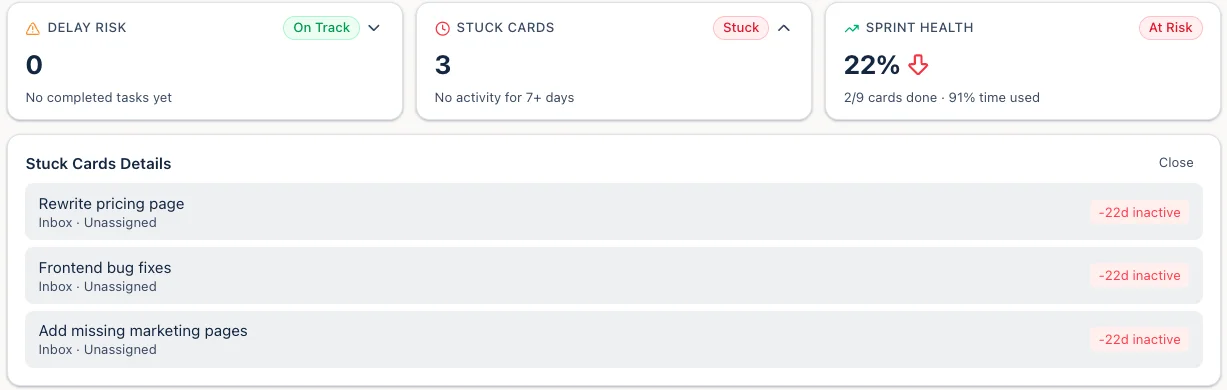
What it is: two different signals that are easy to conflate. Overdue cards are already past their due date - a lagging indicator. Delay Risk flags cards that are trending toward late before the due date arrives - a leading one: either the time left is shorter than the team's own median completion time, or the card has already been open longer than that median.
How to read it: overdue is a lagging indicator - by the time a card is late, the cause is usually upstream. The value is in the pattern, not the individual miss. Ask whether overdue cards cluster around the same owner, the same list, or the same workstream.
When to act: treat Delay Risk as the earlier warning and overdue as the confirmation. If a card shows up in Delay Risk, you still have time to act; if it's already overdue, you're managing the consequence.
What to do: a quick scan each week takes only minutes. Acting on the pattern - rebalancing work or renegotiating scope - is what keeps a single late card from becoming a late release. This is also exactly how you spot a slipping project early instead of at the retro.
Workload: protecting the team from imbalance
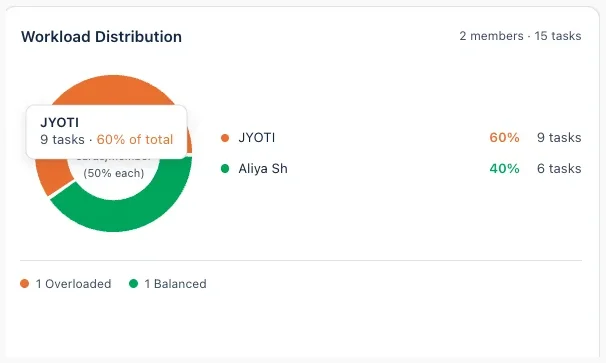
What it is: each person's share of active work, measured against an even split across the team (the "fair share").
How to read it: one of the most expensive problems on a busy team is invisible - a few people are overloaded while others have slack. Otper scores each person critical, overloaded, balanced, or underloaded based on their share versus fair share, and surfaces a suggested fix: reassign a specific number of cards from the most overloaded person to the most underloaded one.
When to act: the moment someone is flagged overloaded, not after they're flagged critical. Left unchecked it leads to burnout and single points of failure.
What to do: redistribute before a crunch starts, not after it fails. This is the same owned work principle that makes a board trustworthy in the first place - imbalance is only visible when every card has a clear owner to begin with.
Throughput: is completion keeping up with intake?
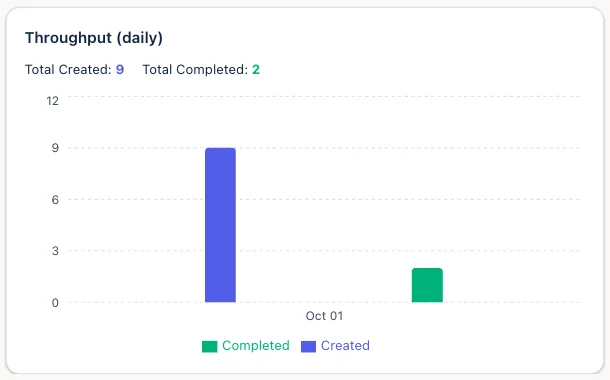
What it is: cards created vs. cards completed over the same period - Kanban's equivalent of velocity, without the sprint boundaries.
How to read it: if the team creates far more cards than it completes, the board is accumulating future pressure that isn't visible yet. If completed work drops while intake stays steady, look back at bottlenecks, workload, overdue cards, and stuck tasks to understand what changed.
When to act: when the gap between created and completed widens for two periods in a row - one off week rarely means anything on its own.
What to do: tracking throughput over time helps teams set commitments they can actually keep, and gives you a practical way to evaluate process changes, such as adding capacity to a review stage or reassigning overloaded work.
Due-date patterns and the timeline view
What it is: cards grouped by when they fall due - overdue, today, this week, next week, later, or no due date at all - plus the same dated cards drawn as bars on a Gantt timeline.
How to read it: analytics are not only about the past. A cluster of due dates falling in the same week is a crunch you can see coming and plan around. The timeline is the same cards, not a second plan - move a date on a card and the bar moves with it, so there's nothing separate to keep in sync.
When to act: as soon as a cluster appears more than a week or two out - early enough to move non-critical work or add capacity in advance.
What to do: recurring slippage on one workstream points to an estimation or capacity problem worth addressing at the source, not just the week it happens to land on.
Comparing boards across projects
What it is: the same core numbers - total cards, created, completed, overdue, closed, and active members - laid out side by side across every board you run.
How to read it: if your team runs several projects, the question shifts from "what is stuck on this board?" to "which board needs attention first?" Comparing boards helps you spend attention where the data says it matters, rather than on whichever project is loudest that week.
When to act: normalize by active members before concluding one board is behind - a board with three people will naturally show lower totals than one with ten.
What to do: if you're tracking delivery health across several boards at once, pair this with visual project statuses for a portfolio view, or see how managing multiple client projects uses board comparison specifically for agency and client-service work.
Turning metrics into a weekly report
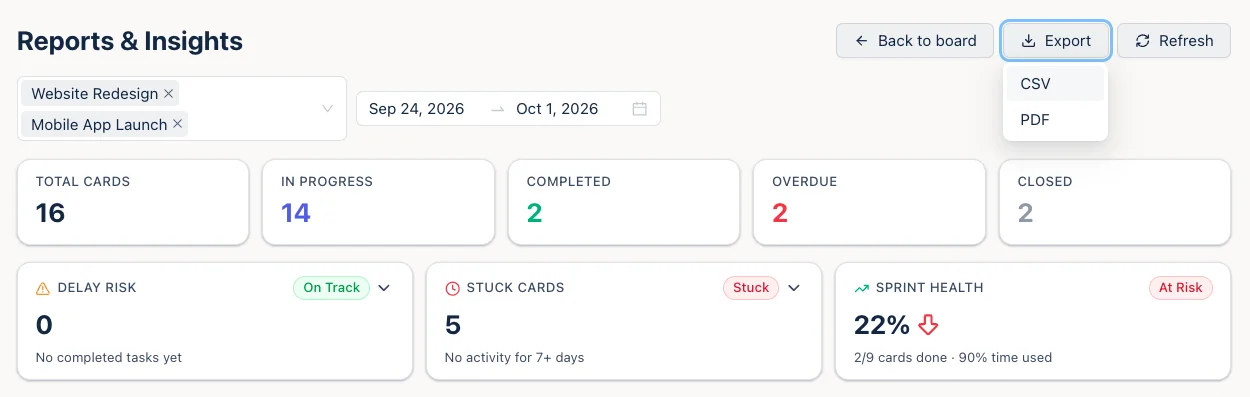
A report that someone has to assemble by hand is a report that eventually stops getting sent. Otper's numbers are live from board activity, so "writing the report" is really just picking a date range and the boards to include, then reading what's already there.
For a ready-made structure - what to include, in what order, and how to phrase it for stakeholders who don't open the board themselves - see the full weekly project status report template. The short version: lead with throughput and bottlenecks, name anything overdue or stuck, flag workload imbalance before it becomes a complaint, and close with the one change you're making this week.
Turn it into a weekly habit
None of this requires a data analyst. A short weekly review is enough: scan bottlenecks, then delay risk, then stuck tasks, workload, and throughput - and commit to one change. Measure whether it helped the following week. This is the same board-review habit from the complete guide to Kanban for teams - metrics and the habit of reading them are two halves of the same discipline.
Analytics are only as trustworthy as the board underneath them, so if the numbers look off, revisit how your board is set up - owners, due dates, and clear stages are what make the data mean something.
Common mistakes with Kanban metrics
- Measuring velocity on a Kanban board. Velocity is a Scrum concept tied to fixed-length sprints and story points. Kanban runs continuous flow, so points-per-sprint doesn't exist to measure. Fix: use throughput - cards completed per period - as the equivalent number.
- Averaging completion time across very different work. A one-day bug fix and a three-week feature shouldn't share one median; the number stops meaning anything. Fix: segment by board, label, or card type before you trust the median.
- Ignoring the Review column. It's easy to assume review is quick because it's "just a check." It's often the biggest bottleneck precisely because nobody's watching its WIP limit. Fix: cap Review the same as any working column, and check its score first.
- A dashboard nobody opens. A report that isn't part of anyone's weekly routine won't catch anything before it's too late, no matter how good the numbers are. Fix: put the fifteen-minute review on the calendar, not just the report in a tab.
- Metrics without an owner. A number only prevents a miss if someone is accountable for acting on what it shows. Fix: name who reads each metric and what they're expected to do when it flags.
- Treating overdue as the only signal. By the time a card is overdue, the pattern that caused it has usually been running for weeks. Fix: watch Delay Risk and Stuck Cards as the earlier warning, overdue as the confirmation.
- Comparing boards with very different team sizes head-to-head. A board with three people will always show smaller totals than one with ten - that's not a performance gap. Fix: normalize by active members before drawing a conclusion.
Metrics by team type
Same reporting engine, different numbers worth watching first.
Dev teams
Watch: List Bottlenecks (Review is usually the constraint) and Stuck Cards (a silent blocked dependency).
Agency teams
Watch: Board comparison (which client is behind) and Workload (billable capacity per person). More on how agency teams run delivery reporting across multiple clients at once.
Marketing teams
Watch: Throughput (campaign output per period) and Delay Risk (launch dates trending late before they're actually overdue). See Kanban boards for marketing teams for the full picture.
Ops and support teams
Watch: Due-date spread (the crunch coming next week) and Workload (even distribution across an on-call rotation).

Reporting tools compared: what's built in vs. what needs a dashboard
Every metric in this guide is part of Otper's built-in reporting - no separate dashboard tool to configure. Here's how that compares to what ships out of the box elsewhere.
| Tool | Built in | Needs a dashboard or add-on |
|---|---|---|
| Otper | Throughput, delay risk, bottlenecks, stuck cards, workload, due-date spread, board comparison | Nothing - all built in |
| Trello | Basic card counts per list | Burndown, cycle time, workload - via Power-Up or add-on |
| Jira | Burndown and velocity (Scrum projects), cumulative flow | Kanban-specific cycle time needs a report configured |
| ClickUp | Basic charts | Custom dashboards for workload or bottleneck views |
| Asana | Status updates, basic progress | Workload view and reporting dashboards on higher tiers |
| monday.com | Basic widgets | Most cross-board reporting needs Dashboards (higher tiers) |
Capabilities checked September 2026 against each vendor's published documentation. See full side-by-side comparisons for pricing and feature detail.
FAQ
What are Kanban metrics?
Numbers derived from your board's own activity - throughput, completion time, bottlenecks, stuck cards, workload, and due-date spread - used to diagnose problems in how work flows, rather than guess at them.
What is a good cycle time in Kanban?
There is no single good number - it depends on how many stages your board has and how granular your cards are. A team with five stages and small cards will naturally run faster than one with ten stages and large cards. Compare your own trend over time instead of chasing an external benchmark.
How do you find a bottleneck on a Kanban board?
Watch for a stage where cards accumulate faster than they drain. Otper's List Bottlenecks view scores every list by average days spent there, so the stalling stage is named rather than guessed at.
What is throughput in Kanban?
Throughput compares how many cards were created against how many were completed in a period. If creation consistently outruns completion, the board is accumulating pressure it hasn't shown yet.
Cycle time vs lead time - what's the difference?
Lead time is measured from when a card is created to when it's done. Cycle time is measured from when work actually starts to when it's done, excluding time spent waiting in a backlog. Otper's median completion time is a lead-time measurement - full creation-to-close span.
How often should you review Kanban reports?
A short weekly review is enough for most teams: scan bottlenecks, delay risk, stuck cards, and workload, then commit to one change and check whether it helped the following week.
Does Kanban use velocity?
No. Velocity is a Scrum concept tied to fixed-length sprints and story points. Kanban is continuous flow, so throughput - cards completed per period - is the equivalent measure, and it's what Otper reports.
Can you get Kanban reports without building a dashboard?
Yes. Every metric in Otper is derived from board activity you're already generating - pick a date range and the boards to include, and the numbers are there. Nothing to configure first.
Keep reading
- Kanban for teams: the complete guide
- How to spot a slipping project early
- Managing 50+ projects with visual project statuses
- Weekly project status report template
- Workflow automation that saves time
- Kanban board setup, step by step
- Project management with Otper
- Working with cards
See where your work is getting stuck
Open your board’s reports in Otper and start with one question: where is work getting stuck this week?
Get started with Otper