How to assign clear ownership across remote teams
Remote teams rarely lose accountability in an argument. They lose it quietly, in a task everyone assumed someone else had picked up. In an office, proximity corrects that. Remotely there is none, so ownership has to be written onto the work and able to survive a handover.
This is one piece of a wider discipline - see the complete guide to Kanban for teams for the rest: columns, WIP limits, automations, and the metrics a shared board should show.
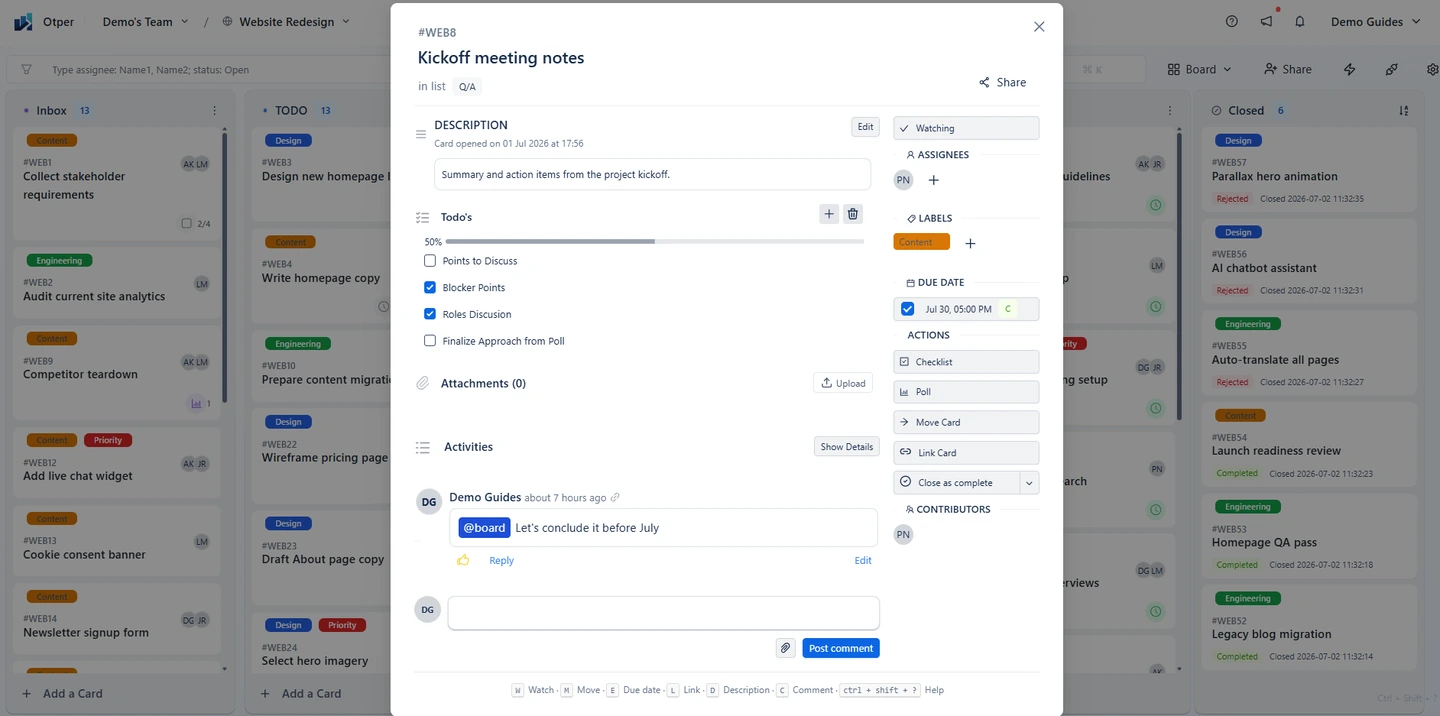
Ownership is scoped to the board
You assign work to members of the board it lives on, not to anyone in the organisation. The people who can own a card are exactly those given access to it, so nobody is handed a task on a project they cannot see.
Name one accountable person
A card can carry several assignees - useful for shared work, and the easiest way to end up with a task four people are technically on and nobody is answerable for. The convention worth adopting: one assignee is accountable for the card reaching done, everyone else is a contributor or watcher. That is a team agreement, not a rule the product imposes.
Expect some cards to be created unowned
They will be. Work gets captured mid-call or late in the day, and assigning it is the step that gets skipped. Make unclaimed work resurface on a schedule instead: a scheduled automation can find cards with no members assigned and comment on them. Otper ships a template that runs on the first of each month, posting "This card has no assignee - please claim or assign it." Or filter a board by no assignee to sweep by hand.
Ownership leaves a trail, not just a name
A current assignee tells you who is answerable now. It says nothing about who was answerable in March. Otper keeps both: anyone who has worked the card is recorded in its Contributors section, and unassigning someone preserves them there with the dates they were assigned and unassigned. The card lists active members and past contributors separately, so "who has touched this, and when?" is answered by the card rather than by memory.
A guard keeps it clean: unassign within five minutes and the record is deleted outright as a mis-click.
When the whole engagement changes hands
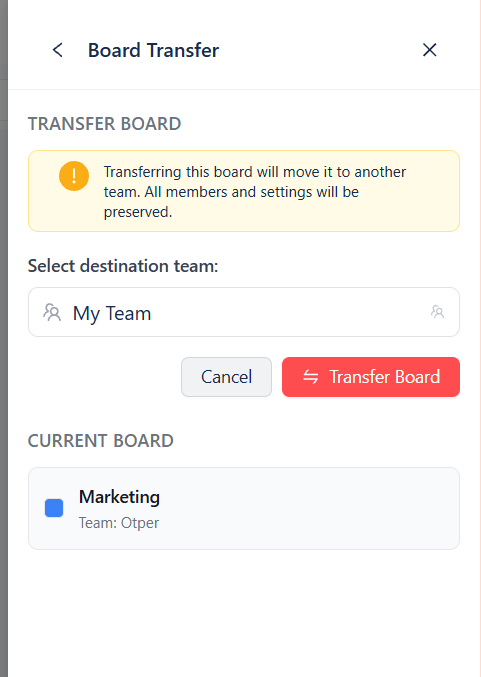
Reassigning cards one by one is the wrong tool when a whole project moves between teams - a client passed to another pod, a product handed to its maintainers. Transfer the board instead, from Board Settings → Board Transfer. It moves to the destination team intact, and board members not already in that team are added as guests and emailed an invitation, so the people who did the work keep access to it.
Only board administrators can start a transfer. The board is closed for the move and reopened when it completes, so nobody edits mid-transfer, and admins on both teams are notified. A transfer is blocked if the destination team already has a board with the same name, slug or key.
Check that ownership is real
An assignee on a card that has not moved in three weeks is a name, not ownership. Per-member counts and workload share against the team average tell you which is which.
FAQ
Who can I assign a card to?
Members of that board. The assignee list is drawn from board membership, so ownership is bounded by who has actually been given access to the work rather than by the whole organisation.
Can a card have more than one owner?
Yes. A card can carry several assignees. Naming one accountable person and adding the rest as contributors is a team convention worth adopting, not a rule the product enforces.
What happens when someone is unassigned from a card?
They stay on the card as a past contributor, with the dates they were assigned and unassigned. The exception is an unassign within five minutes, which is treated as a mis-click and removed entirely.
How do I hand a project to another team?
Transfer the board. It moves to the destination team with its cards, comments and contributor history, and any board member who is not already in that team is added as a guest so nobody loses access.
Keep reading
- Working with cards, assignees and comments
- Managing multiple client projects
- Knowing a project is slipping before the deadline
Make ownership visible
Assignees on the card, a contributor trail that outlives them, and a clean handover when work moves teams.
Get started free