Free project management software for small teams
You open the shared spreadsheet on Monday and the dates are already wrong. Someone moved a deadline in chat, someone else is still chasing updates by message, and nobody updated the board you set up last month. With three people, you should not need a status meeting to learn what is waiting on a decision, yet that is where your week starts.
Choosing free project management software for small teams starts with the workflow you want to keep. If a tool needs constant tidying before anybody can understand it, the subscription price is only part of the cost.
This guide covers what a free plan realistically buys you, how the main free tiers differ, what changes depending on whether you are a small business, a startup or a freelancer, and the point at which a free plan stops being the right answer.
What “free” actually means, tool by tool
Free tiers are not generous or stingy in the abstract. They are shaped around a limit the vendor cares about, and that limit is what decides whether a plan fits you. Some cap the number of people, some cap the number of projects, and some cap how the workspace is structured.
Here is what each vendor publishes for its free plan:
| Tool | People on the free plan | Other published limits |
|---|---|---|
| Otper | Up to 3 teammates | Unlimited projects; core reporting included |
| Trello | Up to 10 collaborators per Workspace | Up to 10 boards per Workspace |
| Asana | Up to 2 users on the Personal plan | Dashboards begin on the Starter plan |
| ClickUp | Unlimited members | Limits on spaces, lists and folders |
Read from each vendor’s own pricing page on 16 September 2026. Free plans change often, so confirm before you commit a team to one.
Read that table against your own situation rather than looking for a winner. A five-person team is already outside Otper’s and Asana’s free tiers but inside Trello’s. A two-person team running fifteen client projects will meet Trello’s board cap long before it runs out of seats. The right question is which limit you will hit first. For a fuller side-by-side, see Otper vs Trello and Otper vs Asana.
One difference worth noticing is where reporting sits. On Otper’s free plan, core reporting is included rather than held back, so you can judge whether the numbers are useful before paying for anything.
If you have three or fewer people and more than one project, Otper’s free plan is the only one here with unlimited projects and reporting.
Three people or fewer? Your whole team fits on the free plan
Unlimited projects and core reporting, with no trial clock and no credit card.
Create your free workspaceStart with one real delivery
Pick a project due in the next few weeks: a website update, a customer onboarding package or a product launch. Write down its deliverables, then break each one into tasks small enough to complete and review. “Improve onboarding” is a goal. “Draft the welcome email and get approval” is work someone can finish.
In Otper, create a board for that project and add lists such as Ready, In Progress, Review and Done. Each card can carry assignees, dates, a checklist, attachments and comments. Agree on one accountable person per task as a team practice; the product also supports several assignees.
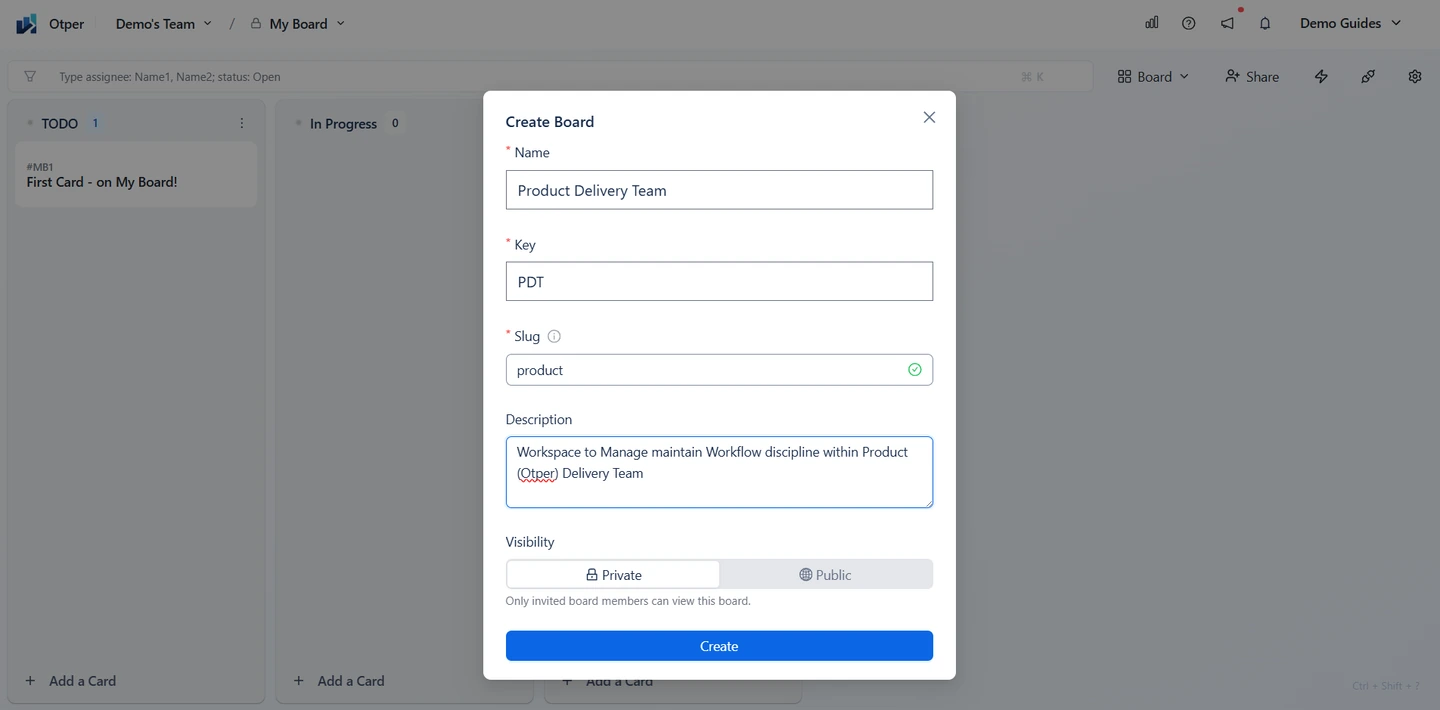
Resist the urge to model the whole business on day one. A board that describes one real project accurately is worth more than a workspace that describes every project vaguely. You will learn more from a fortnight of honest use than from an afternoon of configuration.
Check what the free plan actually covers
Otper’s free plan includes unlimited projects, up to three teammates and core reporting. That makes it a useful starting point for a small working group. It does not mean every feature or every team size is free. Read the pricing page for the current boundaries and compare them with the people who need access.
When evaluating a project management tool for small team delivery, check member limits, project limits and which reports you will use. Also ask who will administer the workspace. An affordable setup still becomes expensive if one colleague spends Friday afternoon rebuilding everybody’s updates.
Count the people who genuinely need an account, not everyone who might glance at the work. A client who wants an occasional update usually needs a summary, not a seat. Getting that count right before you invite anyone is the difference between a free plan that fits and an unplanned upgrade in week three.
For a small business: separate requests from commitments
The search for free project management software for small business often begins with scattered customer requests. Put incoming work into an intake list rather than treating every request as an immediate promise. During a short planning review, clarify the outcome, choose an assignee and decide whether there is capacity to start.
A design studio might receive five changes while two layouts are already in review. Keeping requests visible without starting them all protects the work already promised. Task ownership helps here, but so does an honest decision to leave something in the queue.
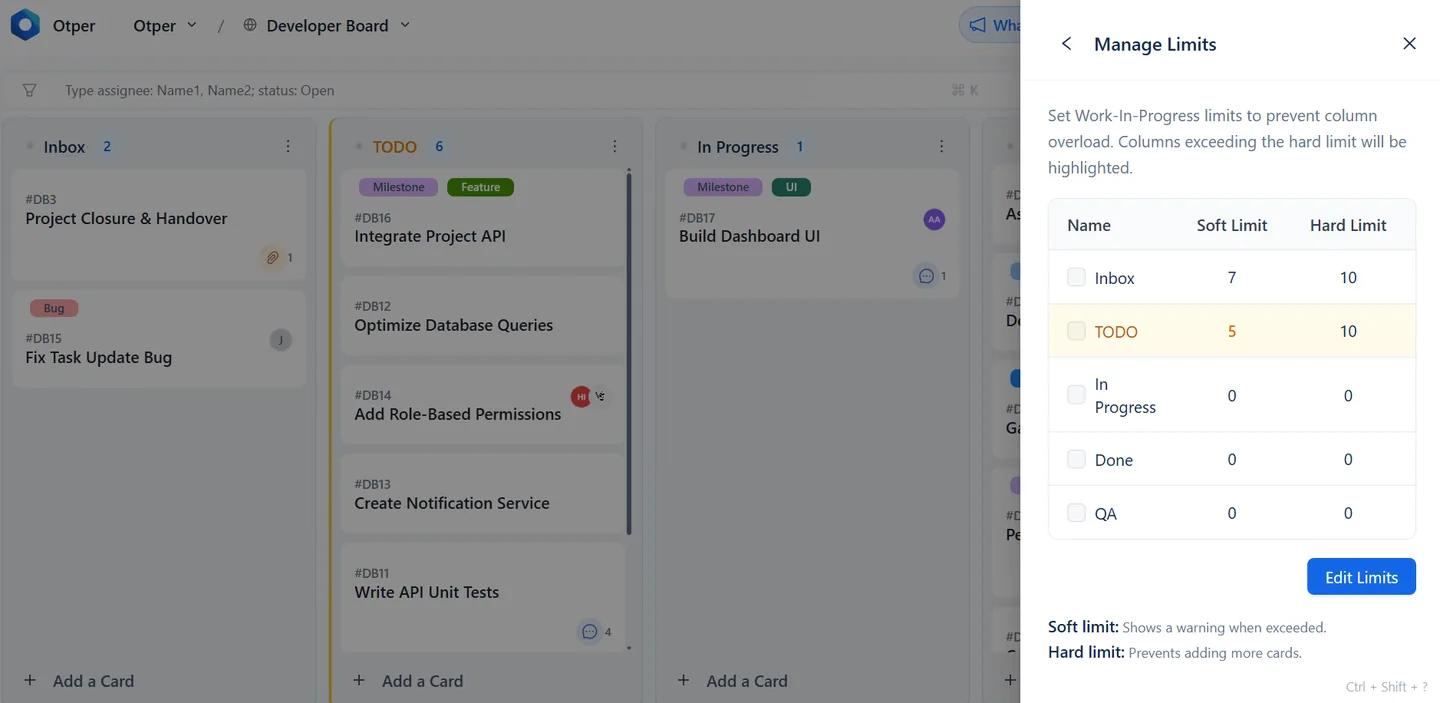
Once that intake habit holds, put a work-in-progress limit on the stage where work piles up, usually review. Each list in Otper takes a soft limit that turns the column amber as a warning, and a hard limit that refuses the card outright until something leaves. Both are off until you set them, so you can introduce the constraint when the team is ready for it.
For a startup: keep the process small
A simple project management tool should make the next action easier to see. Start with a few workflow stages and add another only when a real handoff needs it. Use labels for work types rather than creating a separate board for every tiny category.
Set realistic dates on commitments and review dated cards in Gantt view when timing matters. The timeline uses the same cards as the board, so the plan and the execution record stay connected. Keep exploratory ideas in the backlog until somebody can explain what finishing them would look like.
Startups change shape faster than their tooling does, so favour a setup you can rearrange. Renaming a list or moving a card keeps its history, which means restructuring the board does not cost you the record of what happened.
For freelancers and solo consultants
Working alone changes the problem. Nothing is lost in a handoff, because there are no handoffs. What goes wrong instead is that several clients progress at different speeds and the least noisy one quietly stalls, and you find out too late that it has slipped a week.
One board per client keeps that visible, and unlimited projects on the free plan means you are not rationing boards to stay inside a limit. Give each engagement the same small set of stages so you can read all of them the same way.
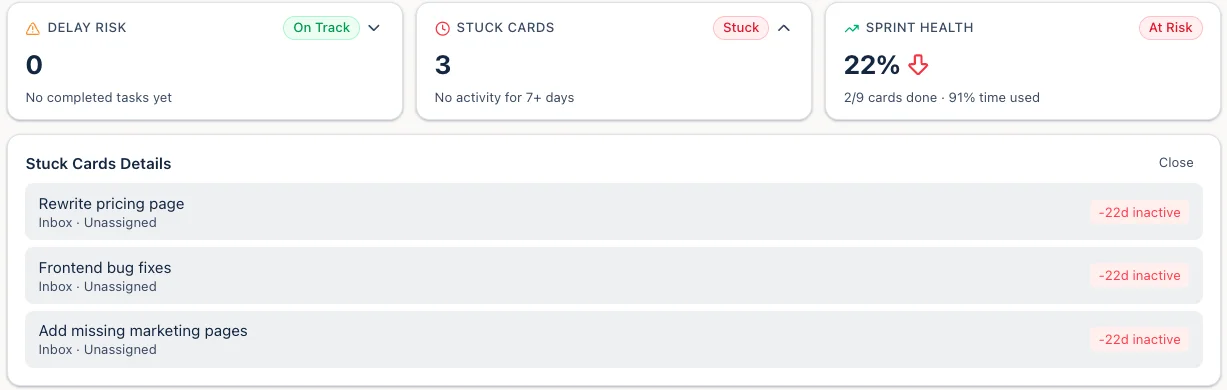
The reporting that matters here is not throughput but age. Cards with no activity for seven days or more are flagged as stuck, which is usually the first sign that a client has gone quiet or you are waiting on an approval you forgot to chase. If you bring on a subcontractor later, the free plan covers up to three people before anything changes.
For personal projects: reduce the ceremony
If you are working alone on non-client work, keep a shorter list of active tasks and review it once a week. A course, portfolio or home improvement project can benefit from a visible next step without needing a team reporting routine. The personal-use guide shows a lighter setup.
Where a free plan runs out
Most teams outgrow a free plan for one of three reasons, and only one of them is about features.
The common one is headcount. Otper’s free tier covers three teammates, so the fourth person is the moment to look at current plans. The second is reporting depth: core reporting is enough to see throughput and where work waits, but a team that reviews delivery weekly across several boards will want the fuller set. The third is that the work itself changes shape - if you start needing dependencies between tasks, resource planning or estimation with story points, that is a different category of tool, and Otper does not cover it.
None of those are reasons to delay starting. A plan you outgrow in six months has still done its job, and the board you built moves with you.
Try it for a week, then judge the result
Use project tracking to spot work that stays in review or misses its agreed date. Otper reports on throughput and on the stages where cards wait longest; check the plan comparison for which reports each plan includes. Those observations help you investigate delays, rather than promising when every task will finish.
At the end of the week, ask whether anyone still had to chase basic status information. If so, improve the card details or the update habit before adding more process. The best starting setup is the one your team can maintain while doing its actual work.
Try it on the project due next
Set up one board, use it for a week, then judge whether anyone still had to chase status.
Frequently asked questions
Is free project management software enough for a small team?
For a team of two or three running a handful of projects, usually yes. The limits that bite first are seat counts and how many projects a plan allows, not features. Count the people who genuinely need access before comparing plans.
What does Otper's free plan include?
Unlimited projects, up to 3 teammates and core reporting, with no card required. Kanban boards, owned work, timelines and the GraphQL API are on every plan, including the free one.
When does a free plan stop being enough?
Usually at the fourth teammate. Otper's free tier covers three, so a growing team moves to Pro at $12 per user per month. Check current plans before inviting people rather than after.
What should I check before choosing a free tool?
How many people it actually covers, whether reporting is included or held back for a paid tier, and how long setup takes before you get a useful number out of it. Measure setup to first report, not setup to first card.