A weekly project-status report template that assembles itself
Most weekly status reports are written from memory on a Friday afternoon, which is why they read as reassurance rather than information. A useful report is assembled, not composed: every line is a number the work already produced, and the only judgement involved is what you are asking the reader to decide.
For the full set of numbers this template draws from, see the complete guide to Kanban metrics and reporting.
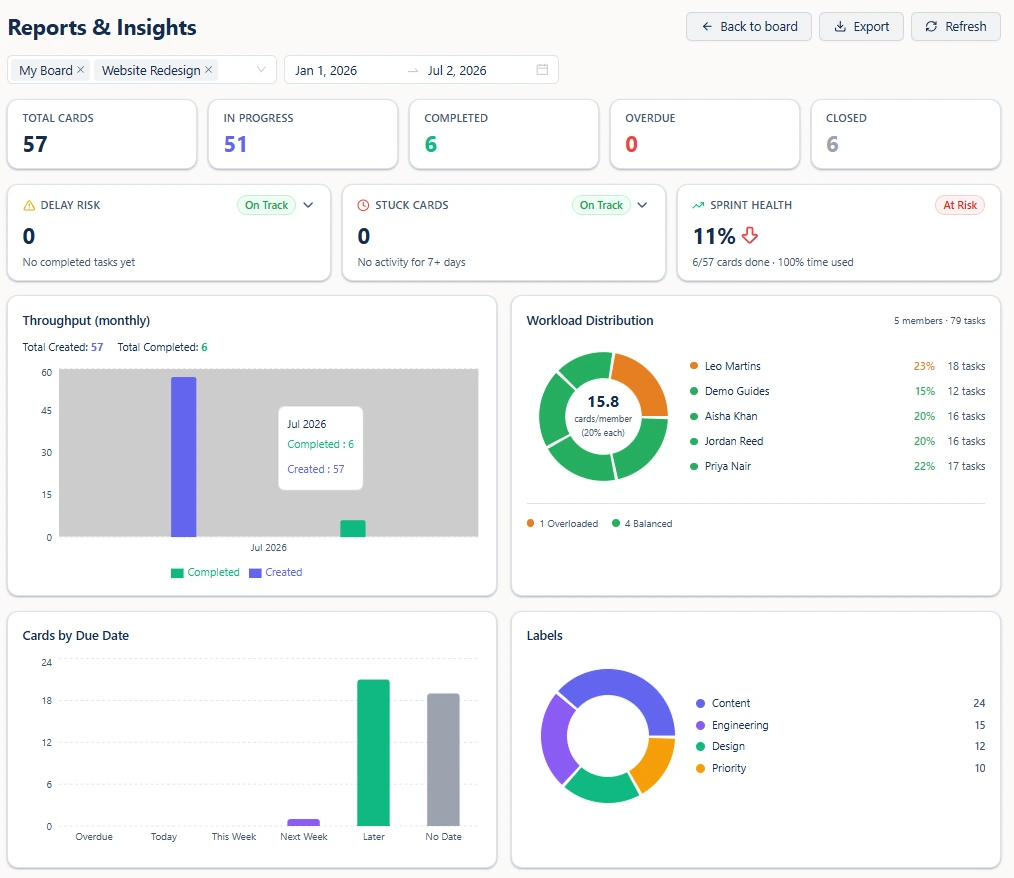
The seven-line template
Copy this into your update format of choice. Each line names where the number comes from, so nobody has to reconstruct it next week.
- Delivered this week. The count of cards completed in the range. One number, no narrative.
- Intake against output. Cards created versus cards completed for the same period. If intake keeps outrunning output, no amount of effort will close the gap and scope is the real conversation.
- Off track. Every card past its due date, with who is on it and how many days it has been. Add open cards flagged as delay risk - running longer than your team's median completion time, or with less time left than that median.
- Blocked. Cards with no activity for seven days or more. Name the handoff each one is waiting on, not the person holding the card.
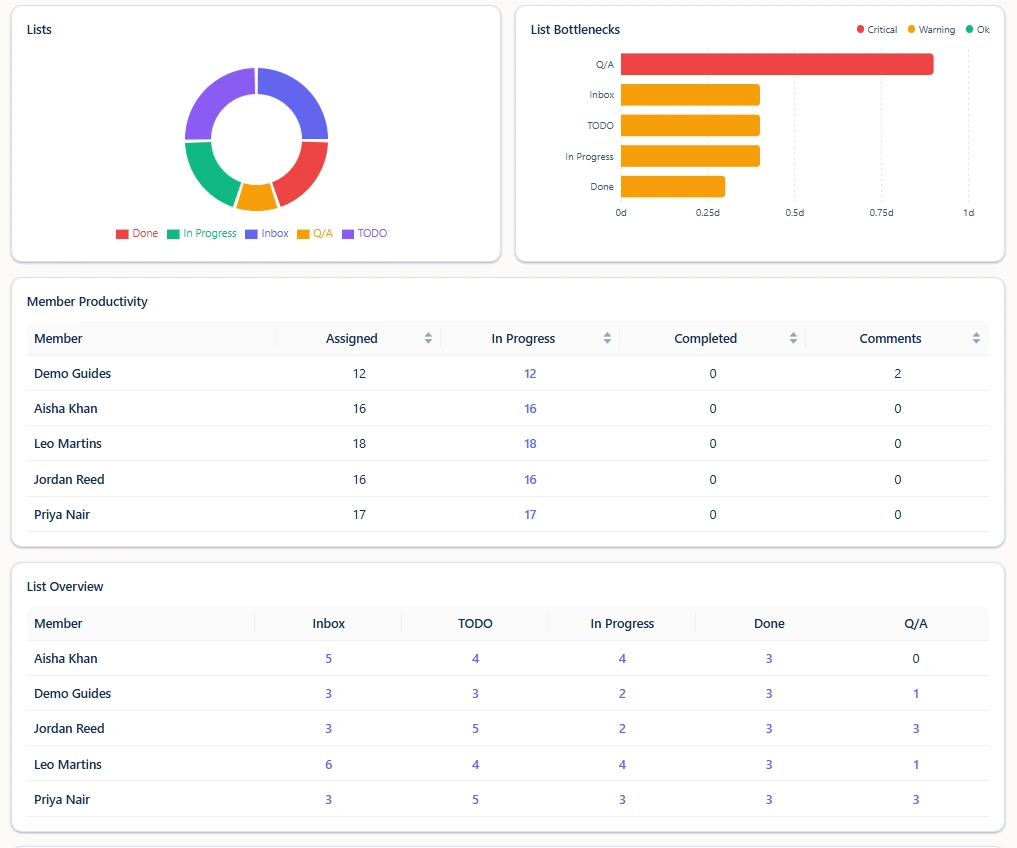
- Slowest stage. The stage with the highest average days per card. This is the line that explains the other six.
- Load. Each person's share of active work against the team average, with anyone flagged overloaded called out by name.
- Decision needed. The one thing you want from the reader this week. If there is nothing, say so explicitly - that is information too.
Why the order matters
The template moves from outcome to cause to decision. Starting with what shipped keeps the report honest - it is hard to spin a completion count. Putting the slowest stage before the load line stops the conversation from turning into a performance discussion when the real constraint is a review queue. Ending with a single decision means the report has a purpose beyond being filed.
Making it repeatable
Scope a report to the boards in play, set the range to the last seven days, and read the seven lines off the screen. When the report needs to leave Otper - a client update, a partner summary, a record for the file - export it as CSV or PDF for exactly the boards and range you selected. Because you choose the scope before exporting, a client sees their engagement and nothing else.
The reports are derived from board activity rather than a separate reporting step, so the quality of the report is really the quality of the board. Cards with owners, due dates and honest list positions produce a report worth sending. Cards nobody has touched in a month produce a report that mostly measures neglect.
FAQ
What should a weekly project-status report contain?
What finished, whether intake is outpacing output, what is off track, what is blocked, where work is slowest, who is carrying too much, and the decision you need. Seven lines is usually enough.
How long should a status report take to write?
Minutes, if the numbers already exist. The only part that needs judgement is the decision you are asking for; the rest should be read off a report rather than recalled from memory.
Can I send the report to a client?
Yes. Scope the report to the boards that client can see, set the date range, and export it as CSV or PDF to attach or paste into your own update format.
Does Otper email the report automatically?
No. There is no scheduled report digest. You pick the date range and boards and export it yourself, which also means you control exactly what a client sees before it goes out.
Keep reading
- Knowing a project is slipping before the deadline
- Reducing status-meeting time
- Bottlenecks, overdue work and workload
Stop writing status reports from memory
Scope a range, read the seven lines, export as CSV or PDF when it needs to leave Otper.
Get started free