How to manage multiple client projects without losing the thread
Running one project well is a planning problem. Running six is an attention problem. Each engagement makes sense on its own, and the trouble hides in the gaps between them - one person quietly committed to four clients, a review stage that stalls only when two projects reach it the same week. A portfolio needs both views: each project, and across all of them.
One board per engagement
The board is the unit of separation. Give each engagement its own lists, labels, members and history. That is partly hygiene - a client should never encounter another client's work - and partly clarity: a board covering two engagements cannot tell you the status of either. Access follows board and team membership, so adding someone to one engagement does not open the others.
Inside each board, labels carry the second dimension: workstream or priority. That keeps board count proportional to clients, not activities.
Report across boards, not one at a time
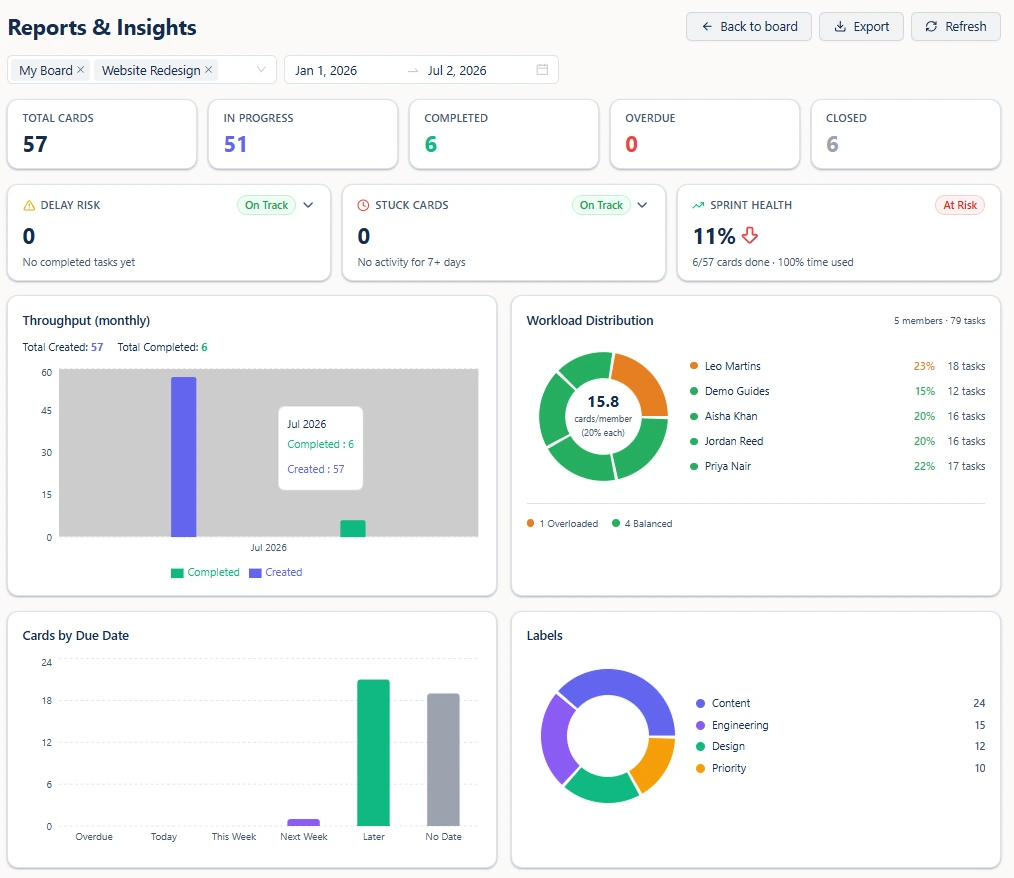
Checking six boards in sequence is how portfolio problems stay hidden: each looks survivable alone. Scope one report across several boards instead and the picture changes - completed counts, throughput, overdue, delay risk, stuck cards and stage bottlenecks, computed over the engagements you selected.
Compare engagements on the same columns
When you need to rank rather than aggregate, board comparison puts every engagement in one table on identical columns: total cards, created, in progress, completed, overdue, closed and active members. The value is in the outliers. High in-progress with low completed means stalling. More overdue than completed needs a conversation this week, not at the next review.
Track team workload across every client project
In an agency running several clients, what breaks first is rarely one badly managed project. It is one person quietly becoming the bottleneck on three projects at once - while looking perfectly normal on each one, because nobody adds the three together.
Otper adds them together. Run one workload report across every active client project and you see each person's share of the team's total active work against the team average, with anyone carrying well above their share flagged as overloaded. You find out while moving two tasks still fixes it.
Keep the date picture separate from the board picture
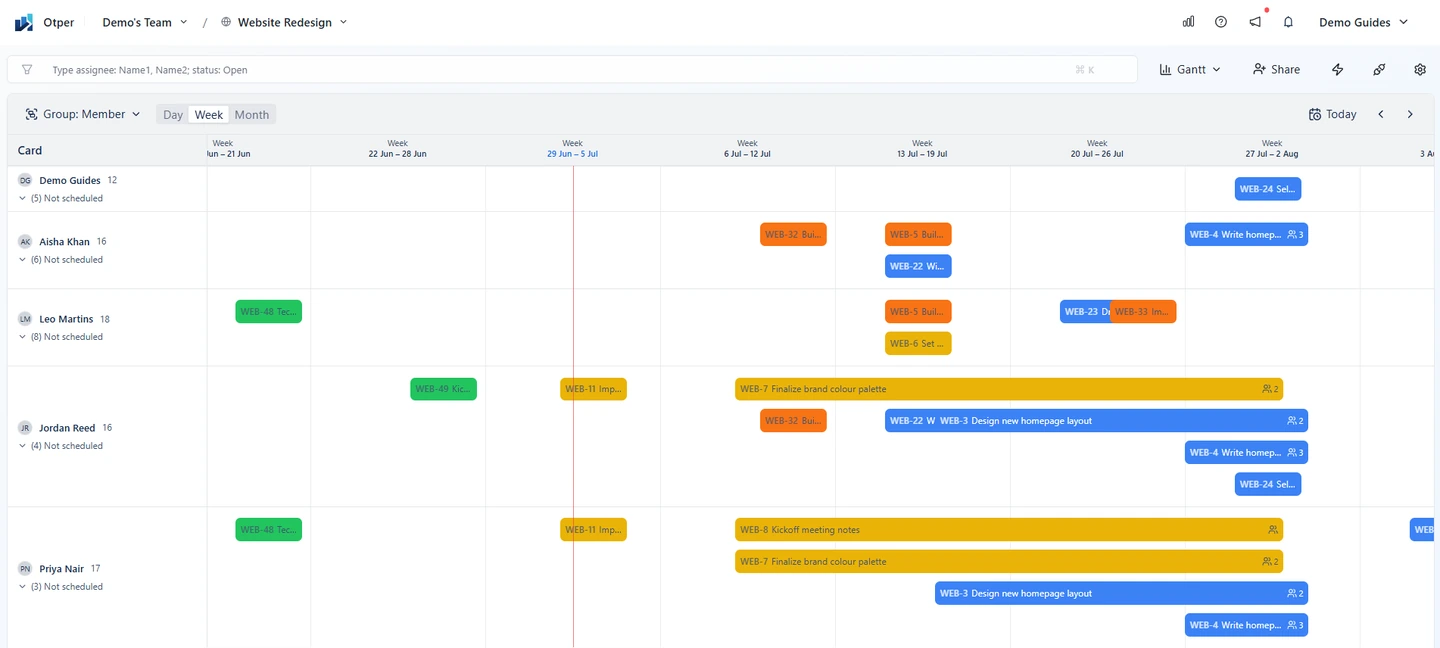
Lists tell you what stage work is in, not when it lands. The Gantt view puts dated cards on a timeline you can zoom by day, week or month and group by status, member or label. It lists undated cards separately too - in a client project, undated work is work nobody has committed to yet.
A workable weekly rhythm
- Once a week, run one report across every active engagement and read the workload line first.
- Use board comparison to find the one engagement that is behaving differently, and spend your attention there.
- Export per-client reports as CSV or PDF, scoped so each client sees only their own board.
- Treat undated cards on a client board as an open question rather than a backlog.
FAQ
Should each client get its own board?
Usually yes. One board per engagement keeps lists, labels, members and history separate, which matters when a client should never see another client's work.
How do I see across all client projects at once?
Scope a report to several boards at the same time, or compare boards side by side with the same columns - total cards, created, in progress, completed, overdue, closed and active members.
What breaks first when an agency takes on too many projects?
Usually one person quietly becoming the constraint across several engagements. Workload share against the team average makes that visible before it turns into missed dates on multiple accounts.
Can a client see only their own board?
Yes. Access comes from board and team membership, so someone added to one engagement does not gain visibility into the others.
Keep reading
- Visual project statuses at scale
- Knowing a project is slipping before the deadline
- Setting up boards and board views
Run every client project from one place
Separate boards per engagement, one report across all of them, and workload visible before it becomes a missed date.
Get started free