8 Best Free & Paid Trello Alternatives With Timelines & Reporting (2026)
Trello is hard to beat for getting started: lists, cards, drag. Teams look for a Trello alternative when the free plan's 10 boards per Workspace run out, or when a board needs a timeline and a report that plain cards do not give. This guide compares eight options for exactly that moment.
We compared the tools on board and seat limits, timelines, reporting, setup effort and price. Competitor figures come from each vendor's published plans (last checked November 2026) and change often, so confirm them on the vendor's page. We make Otper, which is on the list, so we say plainly where Trello and the others fit better.
Updated: November 2026
Trello alternatives compared at a glance
Trello's free plan allows up to 10 collaborators and up to 10 boards per Workspace, and its Standard plan is $5 per user per month billed annually. Otper is listed first here because this guide is about outgrowing plain boards, not because it is the right choice for everyone. Scroll sideways on a phone.
| Tool | Free Plan Seats | Key Free Limits | Paid Starts At | Best For |
|---|---|---|---|---|
| Otper | Up to 3 teammates | Unlimited projects; boards, timelines and core reporting; no credit card | Pro $12/user/mo | Outgrowing plain boards: timelines, ownership and reporting |
| Asana | Up to 2 users (Personal plan) | Task management for an individual or a pair | $10.99/user/mo (annual) | Structured timelines and dependencies |
| ClickUp | Unlimited members | 5 Spaces; 60 MB file storage | $7/user/mo (annual) | Multi-view customisation |
| Notion | Unlimited blocks for one person; limited blocks once a team joins | File uploads up to 5 MB each | $10/member/mo | Boards plus rich documentation |
| monday.com | Up to 2 seats | Up to 3 boards | $9/seat/mo (annual, 3-seat min.) | Customisable dashboards |
| Jira | Up to 10 users | 2 GB file storage; community support | About $9/user/mo | Software and Scrum sprints |
| Linear | Unlimited members | 250 issues; 2 teams | $10/user/mo (annual) | A fast issue board for product teams |
| Basecamp | See Basecamp's plan page | 1 project; 1 GB storage | $15/user/mo, or flat-rate Pro Unlimited | Client-facing project spaces |
When to stay with Trello
Stay if the Power-Ups you rely on are part of how your team works, or if you simply need more people on a free plan: Trello allows more free collaborators than Otper. Rebuilding an integration you depend on is a real cost that no comparison table shows.
1. Otper - Best for outgrowing plain boards
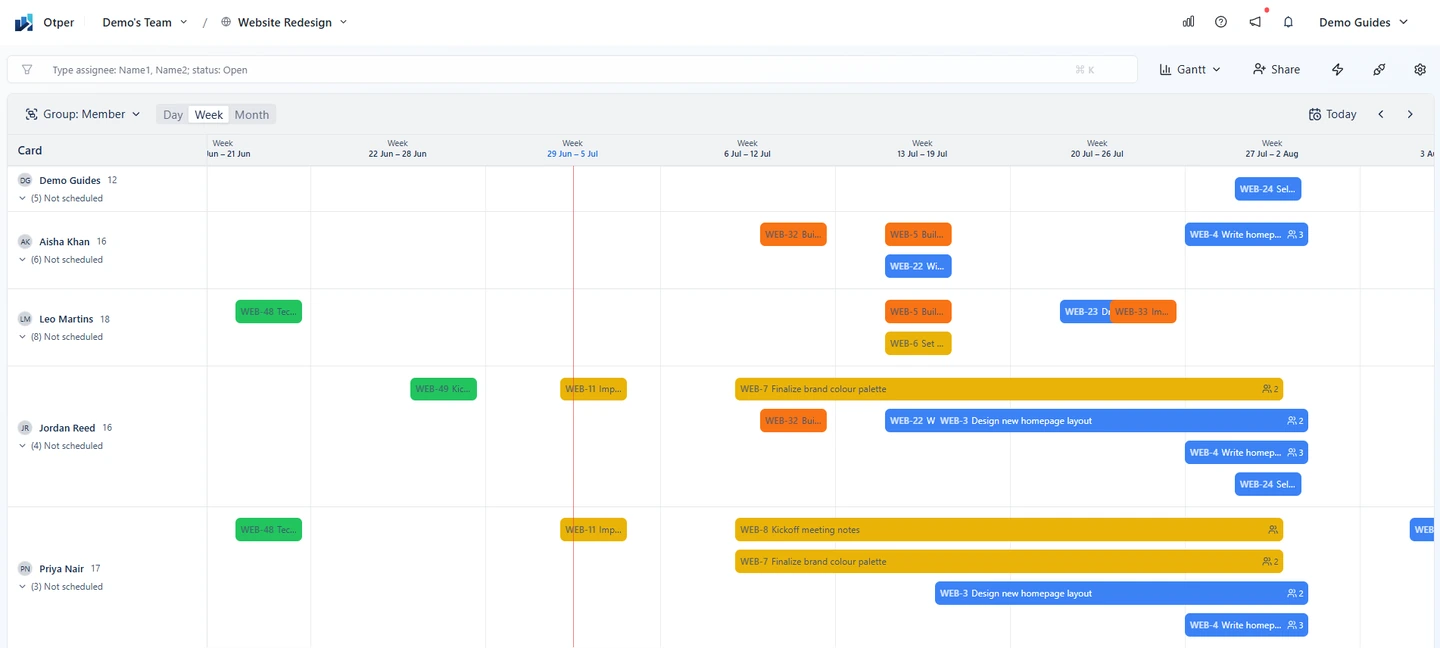
Otper starts from the same shape as Trello, lists and cards you drag, and adds what a board needs once several people depend on it. It has unlimited projects on the free plan, so there is no 10-board ceiling, and your cards also appear as Gantt timelines without re-entering anything. Reporting is built in, with no Power-Ups to add, and lists take work-in-progress limits. The cost is the seat cap: three teammates on Free. Read the Otper vs Trello comparison for more.
Free plan limits
- Up to 3 teammates on the Free plan
- Unlimited projects
- Kanban boards, plus Gantt timelines drawn from the same cards
- Task ownership on every card
- Core reporting (throughput, bottleneck and workload reports are part of the fuller Pro reporting - see the pricing page)
- No credit card required
Pros
- Ownership lives on the card, and each card keeps a history of who held it and when it was handed on.
- One set of cards shown as a board, list, Gantt timeline and tickets, so there is no second plan to maintain.
- Work-in-progress limits per list, a Slack integration, and web, iOS and Android apps.
Cons / trade-offs
- The free plan stops at 3 teammates, so a larger group needs Pro or a tool with more free seats.
- No importer (re-enter active work by hand or use the GraphQL API), and no docs, whiteboards, time tracking, task dependencies or portfolio views.
Pricing: Free plan at $0. Pro is $12 per user per month and adds unlimited members and full reporting and insights.
- Verified plan: Free is $0 for up to 3 teammates, with unlimited projects, boards, timelines and core reporting, and no credit card. Pro is $12 per user per month with unlimited members and fuller reporting.
- See what is included in delivery reporting. Reports are generated from board activity and can be exported to CSV or PDF.
- Works on web, iOS and Android, with a Slack integration.
Start free with Otper, or see the full Otper vs Trello breakdown.
2. Asana - Best for structured timelines and dependencies
Asana adds structure to a board: timelines, dependencies and goals as you move up the tiers. It suits teams whose projects have genuine sequencing. Its free plan is only two users, so the structure comes at a price for anything larger than a pair.
Free plan limits
- Personal plan: up to 2 users
- Basic task and project management
Pros
- Strong structure: task dependencies, portfolio roll-ups and goals on the paid tiers.
- Works for non-delivery teams too, so one system can cover several departments.
Cons / trade-offs
- The free plan covers only 2 users, so a team of three or more pays almost immediately.
- More configuration than a small team usually needs to answer "who has this?"
Pricing: Personal plan at $0. Starter is $10.99 per user per month billed annually, or $13.49 billed monthly.
3. ClickUp - Best for multi-view customisation
ClickUp shows the same tasks in many views and lets you invite unlimited free members. The cost is setup and limits: 5 Spaces and 60 MB of storage on the free plan, plus many options to configure.
Free plan limits
- Unlimited members
- Up to 5 Spaces
- 60 MB of file storage
Pros
- No cap on members, which is rare on a free plan.
- Very broad: many views, docs, goals and dashboards in one workspace.
- Highly configurable if someone on the team enjoys shaping a workspace.
Cons / trade-offs
- The 5-Space and 60 MB limits arrive quickly on a busy workspace.
- The breadth means more setup and more decisions before the first useful board.
Pricing: Free Forever plan at $0. The Unlimited plan starts at $7 per user per month billed annually, or $10 billed monthly.
4. Notion - Best for boards plus rich documentation
Notion's databases can be viewed as boards, and the pages beside them hold specs and notes. It works well when documentation drives the project. You build the board and any reporting yourself, and the free plan is limited once a team joins.
Free plan limits
- Unlimited blocks for one person
- A block limit applies once more than one member collaborates
- File uploads up to 5 MB each
Pros
- Docs, wikis and databases in one place, so a spec and its tasks can live together.
- Flexible enough to model almost any tracker.
Cons / trade-offs
- The free plan is generous for one person and limited for a team.
- You build the project structure yourself, and it has no delivery reporting out of the box.
Pricing: Free plan at $0. Plus is $10 per member per month, with a discount when billed annually.
5. monday.com - Best for customisable dashboards
monday.com offers boards, dashboards and automations in a colourful interface. Its free plan is two seats and three boards, which is tighter than Trello, and paid plans carry a three-seat minimum.
Free plan limits
- Up to 2 seats
- Up to 3 boards
Pros
- Colourful, spreadsheet-like boards that are easy to read at a glance.
- A deep catalogue of automations and views on paid plans.
Cons / trade-offs
- The free plan is for two people and three boards.
- The 3-seat minimum on paid plans raises the floor for a very small team.
Pricing: Free plan at $0. Paid plans start at about $9 per seat per month billed annually, with a 3-seat minimum.
6. Jira - Best for software and Scrum sprints
Jira's free plan allows ten users and is built for backlogs, sprints and issues. It is the natural Trello upgrade for an engineering team and more machinery than a non-technical team usually wants.
Free plan limits
- Up to 10 users
- 2 GB of file storage
- Community support
Pros
- Built for software teams: sprints, epics, backlogs and burndown.
- A generous 10 free users and the wider Atlassian ecosystem.
Cons / trade-offs
- Heavier than a small non-engineering team needs; workflows and permissions take upkeep.
- Planning is oriented around software concepts, so it can feel foreign to marketing or operations teams.
Pricing: Free plan at $0. Standard is about $9 per user per month (published at $9.05 for up to 100 users).
7. Linear - Best for a fast issue board for product teams
Linear is fast and opinionated, with issues, cycles and roadmaps that feel designed for product teams. The free plan caps issues at 250, and it is a poorer match for non-software work.
Free plan limits
- Capped at 250 issues
- Up to 2 teams
Pros
- Fast, keyboard-driven and opinionated about how product and engineering work moves.
- Clean cycles, projects and roadmaps for software teams.
Cons / trade-offs
- The 250-issue cap is easy to reach on an active backlog.
- Built for software teams, so it fits marketing, ops or client work less naturally.
Pricing: Free plan at $0. Basic is $10 per user per month billed annually, or $12 billed monthly.
8. Basecamp - Best for client-facing project spaces
Basecamp gives each project a space for messages, to-dos, files and schedules, and it is easy to bring a client in. It is not board-first, and the free plan allows one project.
Free plan limits
- One project at a time
- 1 GB of storage
Pros
- Messages, to-dos, files and schedules in one calm place, with almost nothing to configure.
- Easy to bring clients into a project.
Cons / trade-offs
- One project on the free plan limits it to a trial for most teams.
- No board-first workflow and little in the way of delivery reporting.
Pricing: Free plan at $0. Plus is $15 per user per month; a flat-rate Pro Unlimited plan is also offered.
How to choose
- Your boards need timelines, owners and reporting, and your core team is up to three people free (more on Pro): Otper.
- You want many views and many free members: ClickUp.
- Your specs live next to your tasks: Notion.
- You are an engineering team: Jira or Linear.
- You work with clients in one shared space: Basecamp.
Move one live board first and keep Trello as the archive until you trust the new setup.
Try Otper free for your first 3 teammates - no credit card required
Unlimited projects, boards and timelines, with one named owner on every card.
Frequently asked questions
What is the best free Trello alternative with unlimited boards?
Trello's free plan allows up to 10 boards per Workspace. Otper's Free plan has unlimited projects, and a board is the project, for up to 3 teammates, with timelines and core reporting included. ClickUp has no member cap on its free plan but limits it to 5 Spaces and 60 MB of storage. If you have more than three people, check each tool's seat limit as well as its board limit.
Which Trello alternative includes Gantt timelines and reporting without Power-Ups?
Otper includes Gantt timelines and core reporting on its Free plan with no Power-Ups to add, and fuller reporting and insights on Pro at $12 per user per month. Asana, ClickUp, monday.com and Jira also have built-in timeline views; which plan unlocks them varies, so check what each tier includes.
Can I migrate my Trello boards easily?
Moving is manual with most tools. Otper has no importer, so you recreate the open cards as a new board, assign owners and leave finished cards in Trello as the archive. If there is too much to retype, boards, lists and cards can be created in bulk through Otper's GraphQL API on every plan. Trello lets you export board data, with the available formats depending on your plan.
What is better than Trello for teams under 15?
It depends on what you are missing. If you have outgrown plain boards and want timelines, ownership history and reporting, Otper suits teams of about 2 to 15, with a free plan for up to 3 teammates. If you need more free seats, ClickUp or Jira offer them. If you are happy with boards but need sprints, Jira fits software teams, and if you want documents beside tasks, Notion does. Stay with Trello if its Power-Ups are part of how your team works.