7 Best Free & Paid Asana Alternatives for Small Teams (2026)
Asana is a strong tool, and its free Personal plan covers only two users. For a team of three to fifteen, that usually means paying early or looking at an Asana alternative. This guide compares seven free and paid options so you can see what each one costs, what it limits and what it does better.
We compared the tools on free seats, price, ownership and history, reporting and timelines and Slack. Competitor figures come from each vendor's published plans (last checked November 2026) and change often, so confirm them on the vendor's page. We make Otper, which is on the list, so we say plainly where Asana and the others fit better.
Updated: November 2026
Asana alternatives compared at a glance
Asana's Personal plan is free for up to 2 users; its Starter plan is $10.99 per user per month billed annually. Here is how seven alternatives compare. Scroll sideways on a phone.
| Tool | Free Plan Seats | Key Free Limits | Paid Starts At | Best For |
|---|---|---|---|---|
| ClickUp | Unlimited members | 5 Spaces; 60 MB file storage | $7/user/mo (annual) | A feature-rich free alternative |
| Otper | Up to 3 teammates | Unlimited projects; boards, timelines and core reporting; no credit card | Pro $12/user/mo | Teams of 2-15 needing ownership, audit trail and reporting |
| monday.com | Up to 2 seats | Up to 3 boards | $9/seat/mo (annual, 3-seat min.) | Visual workflow automation |
| Trello | Up to 10 collaborators per Workspace | Up to 10 boards per Workspace | $5/user/mo (annual) | Simple card-based boards |
| Notion | Unlimited blocks for one person; limited blocks once a team joins | File uploads up to 5 MB each | $10/member/mo | Teams combining project docs and tasks |
| Jira | Up to 10 users | 2 GB file storage; community support | About $9/user/mo | Engineering-heavy teams |
| Basecamp | See Basecamp's plan page | 1 project; 1 GB storage | $15/user/mo, or flat-rate Pro Unlimited | Calm, asynchronous collaboration |
When to stay with Asana
Stay if you need portfolio roll-ups across many projects, resource and capacity planning, task dependencies or goals tied to project progress, or if Asana is already the system of record for departments beyond delivery. Several alternatives below do not offer those. The rest of this guide is for teams whose real need is simpler: a board, an owner, and an honest view of progress.
1. ClickUp - Best for a feature-rich free Asana alternative
ClickUp matches Asana's breadth and lets you invite unlimited members on the free plan. You pay for that in configuration time and in limits on Spaces and storage. Choose it if you want one workspace that can be shaped to many teams.
Free plan limits
- Unlimited members
- Up to 5 Spaces
- 60 MB of file storage
Pros
- No cap on members, which is rare on a free plan.
- Very broad: many views, docs, goals and dashboards in one workspace.
- Highly configurable if someone on the team enjoys shaping a workspace.
Cons / trade-offs
- The 5-Space and 60 MB limits arrive quickly on a busy workspace.
- The breadth means more setup and more decisions before the first useful board.
Pricing: Free Forever plan at $0. The Unlimited plan starts at $7 per user per month billed annually, or $10 billed monthly.
2. Otper - Best for teams of 2-15 needing task ownership, audit trail and reporting
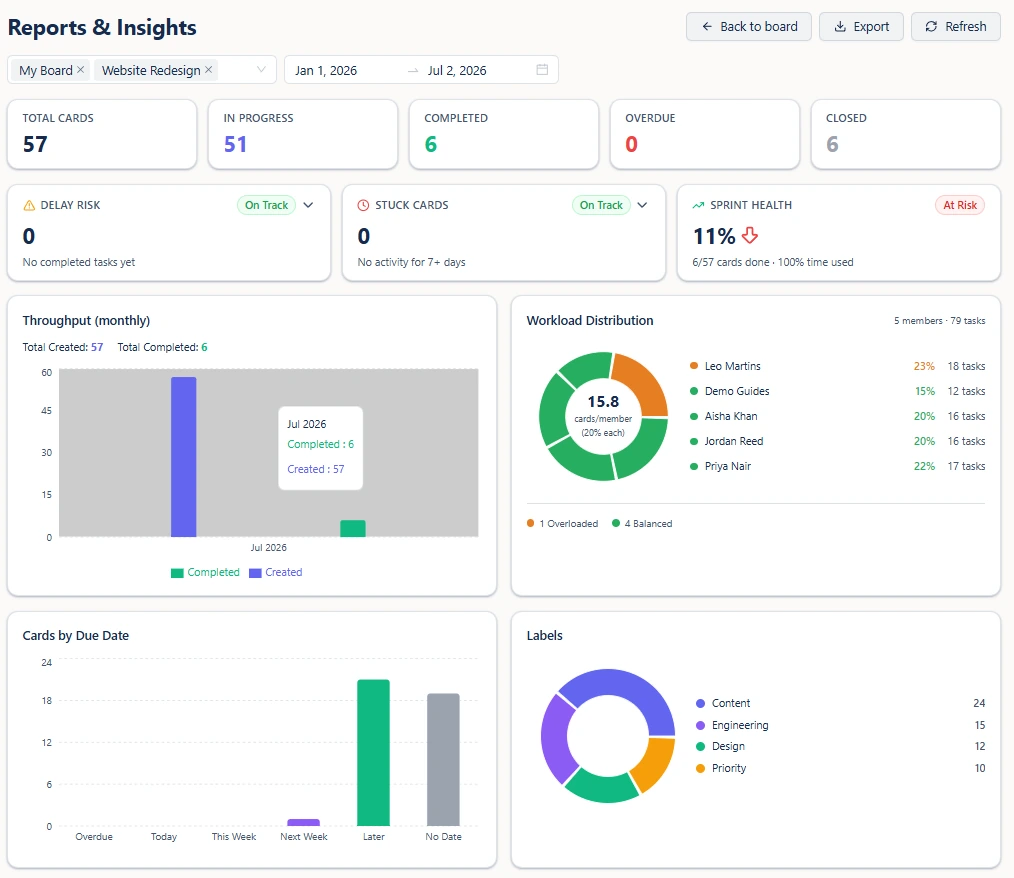
Otper keeps task ownership on the card, and each card records who held it and when it was handed on, so a handoff stays answerable weeks later. That contributor history is what makes it an Asana alternative with an audit trail for small teams. Reporting is derived from board activity, not assembled. It does not do dependencies, portfolios or goals. The full Otper vs Asana comparison covers where each fits.
Free plan limits
- Up to 3 teammates on the Free plan
- Unlimited projects
- Kanban boards, plus Gantt timelines drawn from the same cards
- Task ownership on every card
- Core reporting (throughput, bottleneck and workload reports are part of the fuller Pro reporting - see the pricing page)
- No credit card required
Pros
- Ownership lives on the card, and each card keeps a history of who held it and when it was handed on.
- One set of cards shown as a board, list, Gantt timeline and tickets, so there is no second plan to maintain.
- Work-in-progress limits per list, a Slack integration, and web, iOS and Android apps.
Cons / trade-offs
- The free plan stops at 3 teammates, so a larger group needs Pro or a tool with more free seats.
- No importer (re-enter active work by hand or use the GraphQL API), and no docs, whiteboards, time tracking, task dependencies or portfolio views.
Pricing: Free plan at $0. Pro is $12 per user per month and adds unlimited members and full reporting and insights.
- Verified plan: Free is $0 for up to 3 teammates, with unlimited projects, boards, timelines and core reporting. Pro is $12 per user per month with unlimited members and fuller reporting.
- Works on web, iOS and Android. Connect boards to Slack for Slack task management.
- There is no importer. Export Asana projects to CSV as a reference and recreate the open work; the GraphQL API is available on every plan for bulk creation.
Start free with Otper, or read the full Otper vs Asana breakdown.
3. monday.com - Best for visual workflow automation
monday.com turns work into colourful boards with automations on top, which stakeholders read easily. Its free plan is two seats and three boards, and paid plans start from a three-seat minimum, so it is rarely the cheapest route for a small team.
Free plan limits
- Up to 2 seats
- Up to 3 boards
Pros
- Colourful, spreadsheet-like boards that are easy to read at a glance.
- A deep catalogue of automations and views on paid plans.
Cons / trade-offs
- The free plan is for two people and three boards.
- The 3-seat minimum on paid plans raises the floor for a very small team.
Pricing: Free plan at $0. Paid plans start at about $9 per seat per month billed annually, with a 3-seat minimum.
4. Trello - Best for a simple card-based Asana alternative
If Asana feels like more than you use, Trello strips the job to lists and cards. It allows up to ten free collaborators. What you give up is structure, so dependencies and portfolio-style roll-ups are not what it is for, and richer timelines or reporting generally need Power-Ups or a paid plan.
Free plan limits
- Up to 10 collaborators per Workspace
- Up to 10 boards per Workspace
Pros
- Among the fastest tools to learn: lists, cards, drag.
- A large Power-Up ecosystem for extending a board.
- More free collaborators than most boards-first tools.
Cons / trade-offs
- The 10-board cap per Workspace is a hard ceiling for a team that runs many projects.
- Timelines and reporting generally mean Power-Ups or a paid plan; check Trello's current plan page for what your tier includes.
Pricing: Free plan at $0. Standard is $5 per user per month billed annually, or $6 billed monthly.
5. Notion - Best for teams combining project docs and tasks
Notion puts specs, notes and a task database in one place, which suits teams whose project documentation matters as much as the tasks. The free plan is generous for one person and limited for a team, and you design the project structure yourself.
Free plan limits
- Unlimited blocks for one person
- A block limit applies once more than one member collaborates
- File uploads up to 5 MB each
Pros
- Docs, wikis and databases in one place, so a spec and its tasks can live together.
- Flexible enough to model almost any tracker.
Cons / trade-offs
- The free plan is generous for one person and limited for a team.
- You build the project structure yourself, and it has no delivery reporting out of the box.
Pricing: Free plan at $0. Plus is $10 per member per month, with a discount when billed annually.
6. Jira - Best for engineering-heavy teams
Jira's free plan covers ten users and is built around sprints, backlogs and issues. If most of your work is software, it is likely a better fit than Asana. For non-engineering teams, its workflows and vocabulary are more than most need.
Free plan limits
- Up to 10 users
- 2 GB of file storage
- Community support
Pros
- Built for software teams: sprints, epics, backlogs and burndown.
- A generous 10 free users and the wider Atlassian ecosystem.
Cons / trade-offs
- Heavier than a small non-engineering team needs; workflows and permissions take upkeep.
- Planning is oriented around software concepts, so it can feel foreign to marketing or operations teams.
Pricing: Free plan at $0. Standard is about $9 per user per month (published at $9.05 for up to 100 users).
7. Basecamp - Best for calm asynchronous collaboration
Basecamp collects messages, to-dos, files and schedules in one place with little to configure. It is a good fit for async teams and clients, and less so for board-based delivery tracking. The free plan allows one project.
Free plan limits
- One project at a time
- 1 GB of storage
Pros
- Messages, to-dos, files and schedules in one calm place, with almost nothing to configure.
- Easy to bring clients into a project.
Cons / trade-offs
- One project on the free plan limits it to a trial for most teams.
- No board-first workflow and little in the way of delivery reporting.
Pricing: Free plan at $0. Plus is $15 per user per month; a flat-rate Pro Unlimited plan is also offered.
Moving from Asana: what to expect
Most of these tools will not import an Asana workspace one-to-one, and Otper has no importer at all. A practical approach: export your projects to CSV for reference, recreate only the work that is still open, assign owners as you go and leave finished work in Asana as the archive. Moving one live project first, then the rest, costs less than a full migration that nobody checks.
How to choose
- Three to fifteen people who need owners and history, and can live with a 3-teammate free tier or a $12 Pro: Otper.
- Many free seats and tolerance for configuration: ClickUp.
- Docs and tasks in one place: Notion.
- Software sprints and backlogs: Jira.
- Simple cards and a short learning curve: Trello.
Try Otper free for your first 3 teammates - no credit card required
Unlimited projects, boards and timelines, with one named owner on every card.
Frequently asked questions
What is the best free Asana alternative for small teams?
For a team of two to fifteen that wants clear task ownership, Otper is free for up to 3 teammates with unlimited projects, boards, timelines and core reporting. If you need more free seats, ClickUp allows unlimited members (with 5 Spaces and 60 MB of storage), Trello allows up to 10 collaborators with 10 boards, and Jira allows up to 10 users and suits software teams.
Why did Asana's free plan limit teams to 2 users?
We cannot speak for Asana's reasoning. What its published pricing shows is that the free Personal plan covers up to 2 users, so it works for an individual or a pair, and a team of three or more needs a paid plan or a different tool. Check Asana's pricing page for the current limit, since plans change.
Which Asana alternative includes built-in reporting and timelines on a budget?
Otper's Free plan includes Gantt timelines and core reporting for up to 3 teammates, and Pro is $12 per user per month for unlimited members and fuller reporting. ClickUp (from $7 per user per month billed annually) and monday.com (from about $9 per seat per month billed annually, 3-seat minimum) also offer timeline views and reporting, but which tier unlocks them varies, so compare what each plan includes for your team size.
Which Asana alternative works best with Slack?
Most tools here connect to Slack, and they differ in depth. Otper sends board and card updates to Slack channels and lets you create an owned card from Slack with the /otper create-card command, so requests land on the board with an owner. Check how each tool handles two-way updates before choosing.