Free project management software for nonprofits: programs, volunteers and events on one board
Your nonprofit runs on a WhatsApp group and a couple of spreadsheets. Most weeks that is fine. Then comes the week before an event, and nobody knows who owns what. You scroll back through days of messages to check whether anyone booked the hall, and find two people who each thought the other had. Nobody updated the spreadsheet, because everyone was busy doing the work. Effort is not the problem. Invisible work is.
Why nonprofit work breaks in a group chat
A group chat is good for talking and bad for tracking. Three things make it worse for nonprofits:
- Chat has no states. "I'll look into the venue" reads the same on day one and day ten. There is no way to tell whether a request is new, approved, in progress or stuck.
- Volunteers with changing availability. Someone offers to help on Tuesday, then their week changes. The task stays quietly attached to their name in a message nobody scrolls back to.
- The event date is fixed. A grant deadline or a fundraiser does not move. Every task that sat unnoticed for a week is a week you cannot get back.
None of this is solved by more messages in the WhatsApp group. It is solved by giving every piece of work a place, a status and a name. That is what project management software for nonprofits should do.
The nonprofit board that works
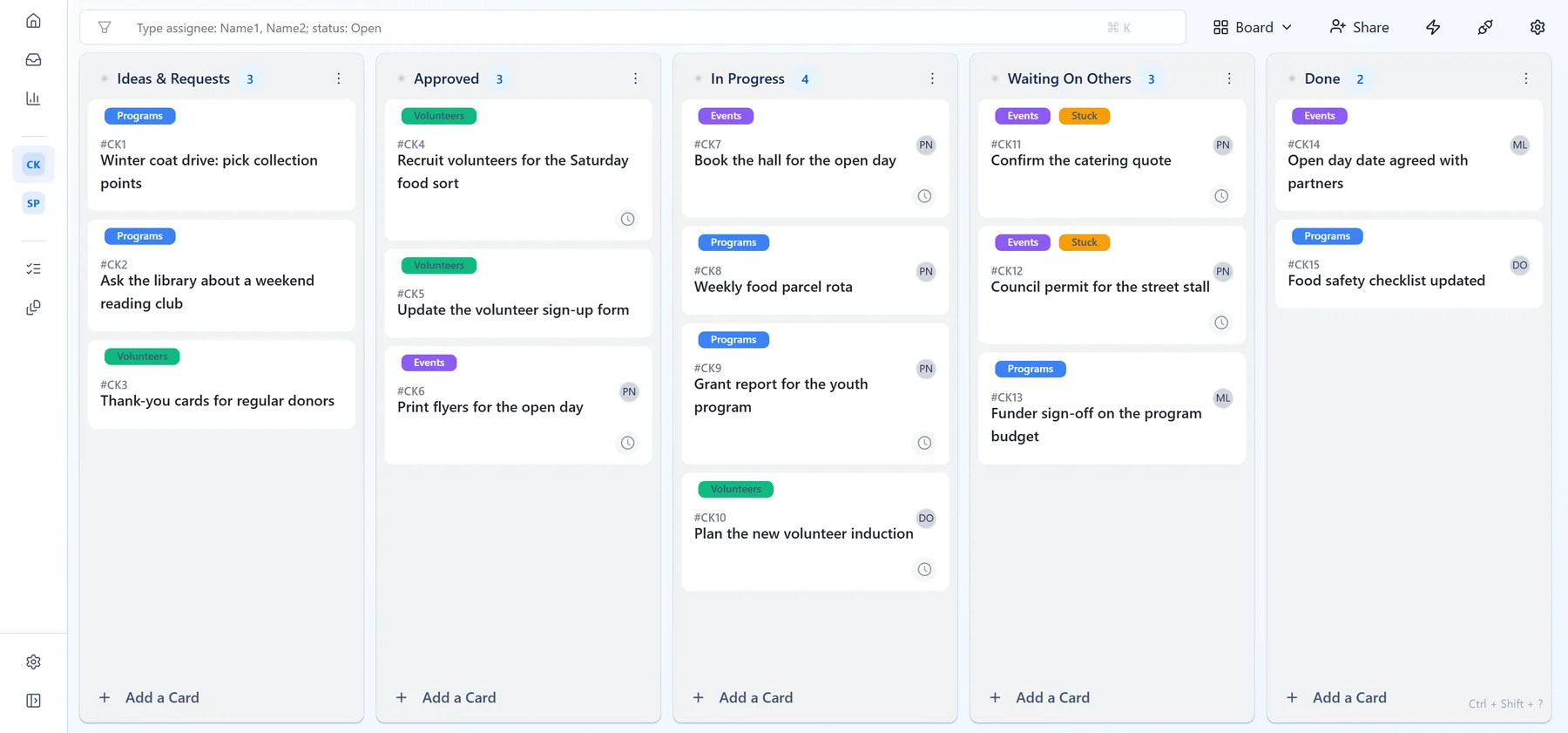
Use one board for everything: programs, volunteer tasks and events, so a small team checks one place. One nonprofit kanban board with five columns covers most of the work:
- Ideas & requests - anything anyone suggests or asks for. Nothing is promised yet.
- Approved - agreed and ready to start, waiting for someone to pick it up.
- In progress - someone is actively working on it.
- Waiting on others - the next move belongs to a venue, a funder, a printer or a partner.
- Done - finished, so nobody has to ask again.
Use labels to tell programs, volunteer tasks and events apart on the same board. When a card moves from one column to the next, that move is the update, with nothing to retype or report in a status meeting. This is why board management software for small nonprofits works better than a spreadsheet: the board is the status report. See how columns and limits work on the kanban boards page.
Every task gets one name
"I thought Priya had it." Most dropped tasks in a small organisation start with that sentence. When a task belongs to everyone in the group, it belongs to no one.
The rule is simple: a card leaves Approved with one accountable person on it. Others can help and comment, but one name answers "who is doing this?" Otper allows several assignees on a card, so "one name" is a team habit, not something the software forces.
This is where volunteer management gets easier. Instead of a coordinator handing out every job, volunteers pick cards from Approved when they have time and assign themselves; any board member with edit access can. If their week changes, they take their name off, leave a note, and the card goes back for someone else. The card keeps a record of who held it. Each person who updates the board needs workspace access, so count who really needs it. More on the owned work page.
The 7-day flag for stuck cards
The tasks that hurt are rarely the difficult ones. They are the ones nobody touched for a week, because nobody updated the board and nobody noticed.
Otper's Weekly stale-card flag automation template fixes that. Every Monday morning it labels any card that has not moved out of its column for seven days. Choose an amber label and the stuck work stands out the moment anyone opens the board. Separately, Otper's reports list cards with no activity for seven days or more, with the column and the person each one sits with.
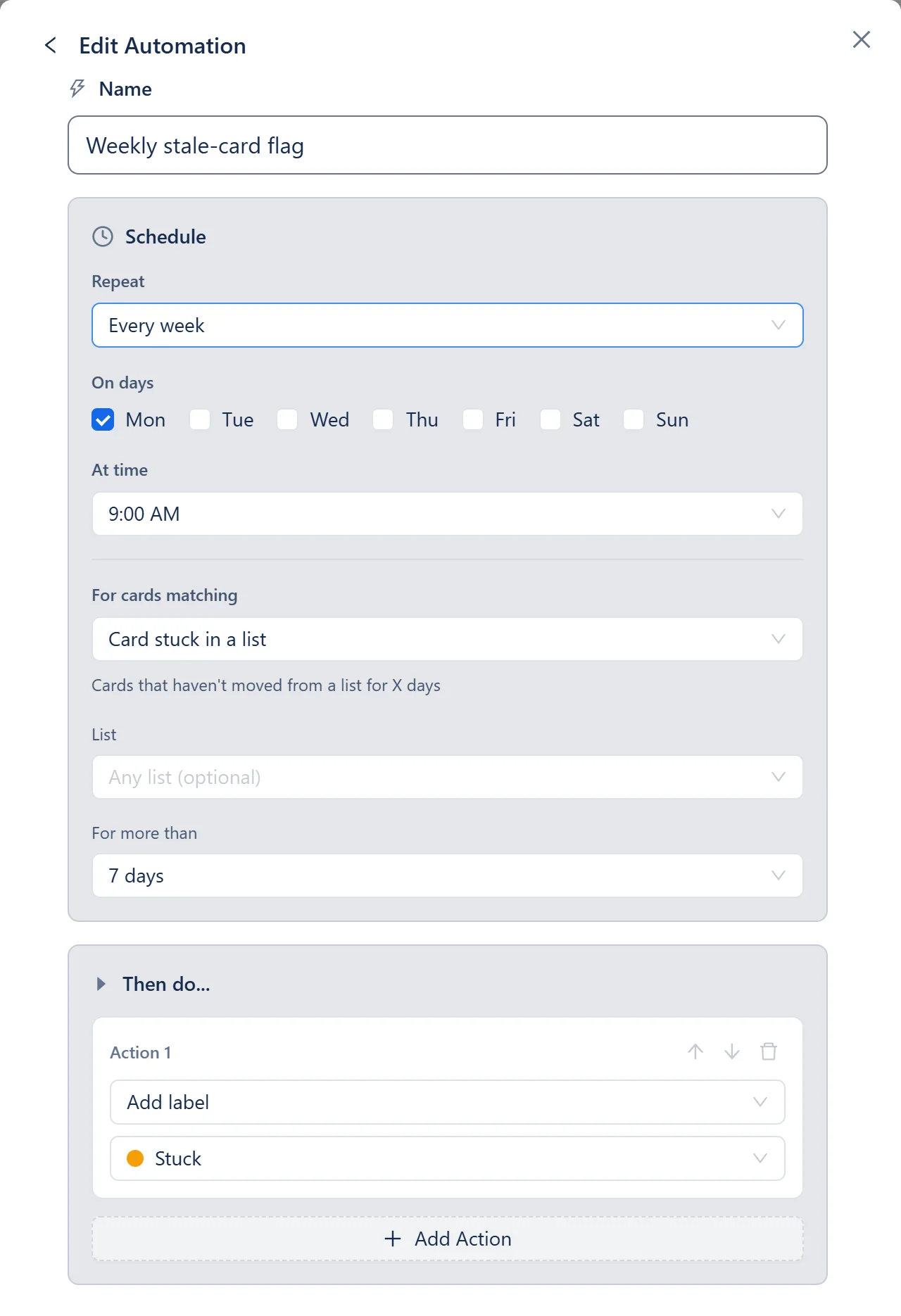
Then replace the weekly status meeting with a 15-minute review of amber cards only. For each one, ask three questions: is it still needed, who owns it, and what is the next step? Everything else on the board is moving and needs no discussion. More signals on the project tracking page.
Which numbers matter for a small nonprofit
Three numbers tell a small team whether things are healthy.
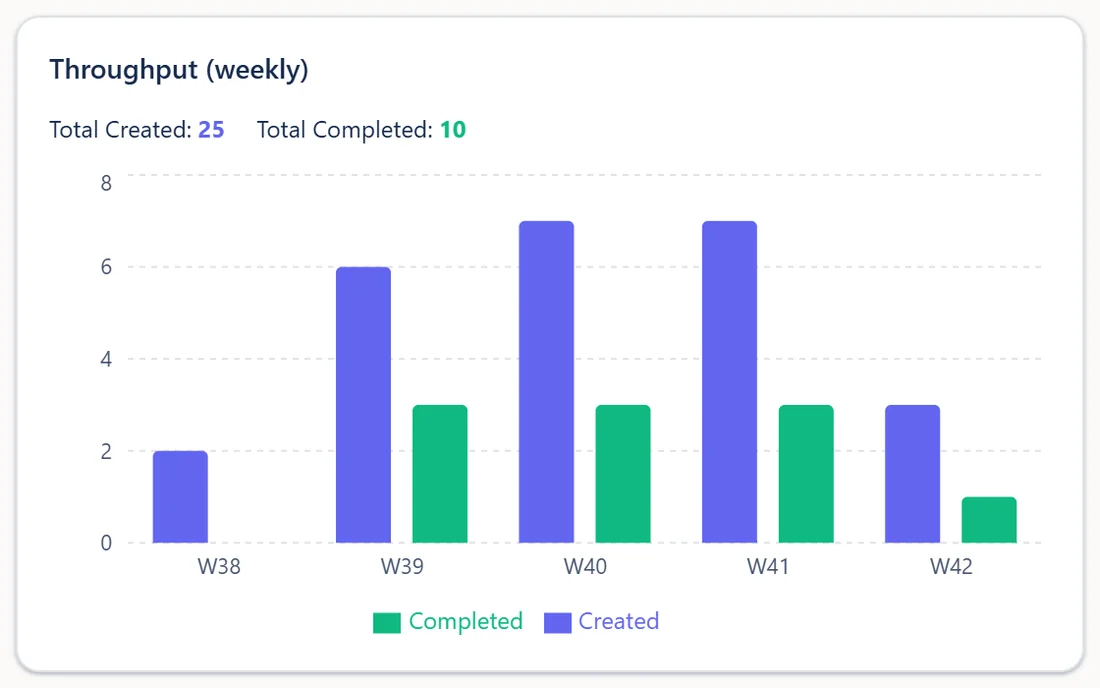
Opened vs closed cards
Cards created against cards finished. If new requests keep outrunning finished work, the backlog is growing before anyone feels it.
Cards stuck in Waiting on others
Work waiting on a venue, a funder or a partner is easy to forget, because it is not your move. If cards pile up in Waiting on others, someone needs to chase, or the event date will arrive before the replies do.

Owner spread
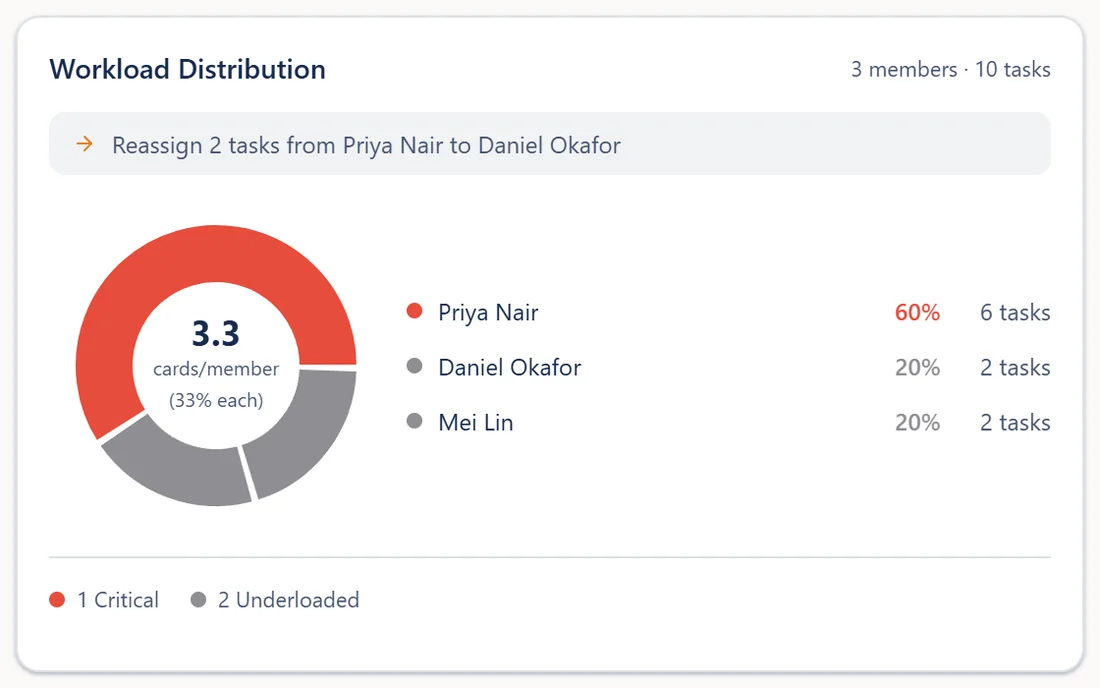
How open work is shared between people. Otper's Workload Distribution report shows each person's share of active cards against the team average and marks anyone carrying more than their share. As a rule of thumb, if one person holds 60% of the open cards, treat it as a burnout warning, not a sign of commitment.
Watch your own trend week to week. The reporting page lists what is built in, and the pricing page shows which reports each plan includes.
Set this up in 10 minutes
Otper is genuinely free for 3 teammates: unlimited boards and projects, core reporting, and no credit card. When you compare free nonprofit tools, check the seat limit first; it is the limit a volunteer team reaches before any other. Our guide to free project management software covers what to compare.
- Create a free account and one board for your organisation.
- Add the five columns: Ideas & requests, Approved, In progress, Waiting on others, Done.
- Add labels for programs, volunteers and events, plus an amber "Stuck" label, and turn on the Weekly stale-card flag automation.
- Move this week's to-dos out of the WhatsApp group into Ideas & requests, invite your teammates, and agree the one-name rule.
Get the plan out of the group chat
One board for programs, volunteers and events. Free for up to three teammates, no credit card.
Create your free workspaceFAQ
Is there really free project management software for nonprofits?
Yes. Otper's Free plan costs $0 for up to 3 teammates, with unlimited boards and projects and core reporting, and needs no credit card. It is not free access for an unlimited volunteer roster, so count the people who genuinely need to update the board.
What is the best board management software for small nonprofits?
The best option is the one your team actually keeps up to date. Look for three things: one shared board for all your work, a named owner on every task, and a clear signal when work stops moving. Then check the free tier against the number of people who need access.
How do you manage volunteers with changing availability on a board?
Attach the task to the card, not to the person. Volunteers take cards from the Approved column when they have time, and if their week changes they remove their name and leave a short note so the card goes back for someone else. The card keeps a history of who held it.
Can a kanban board replace our nonprofit's WhatsApp planning?
It can replace the planning, not the chat. Tasks, owners and decisions go on cards, so the board shows what is happening, while the WhatsApp group stays for quick conversation. A weekly 15-minute review of stuck cards keeps the board accurate.
Related reading
Put next month's event on one board
Five columns, one name per card, and a flag for anything that stops moving. Free for up to three teammates.