Jira vs. Otper: choosing a tracker for a small engineering team
For a team of 5 to 15 engineers, the useful question is not which tool is more powerful. Jira is a mature, deeply configurable issue tracker used by engineering organisations everywhere, and it earns that position. The question is how much process you want to maintain before the tool can tell you where a piece of work actually is.
Reporting you do not have to build first
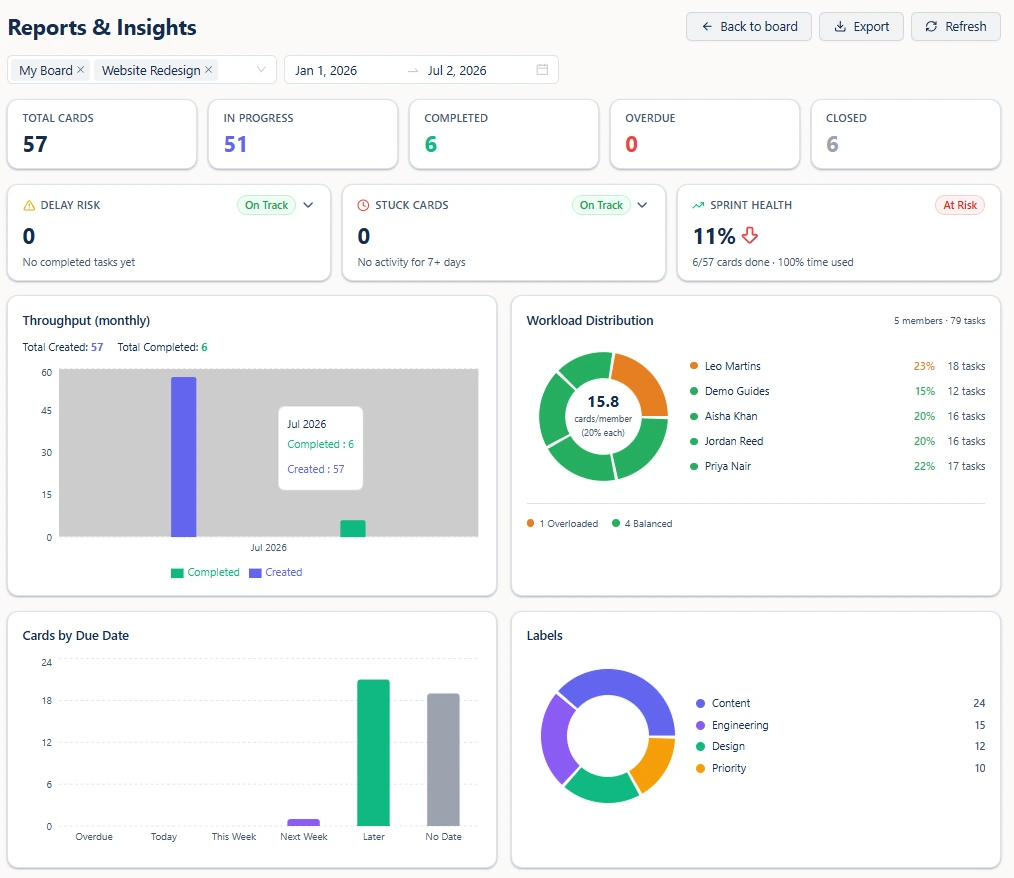
This is the clearest practical difference. In Otper, every metric is derived from board activity you are already generating - there is no dashboard to assemble and no report to configure. Pick a date range and the boards you care about, and you get completed counts, throughput, the overdue list, delay risk, stuck cards, stage bottlenecks and workload balance.
Two of those are worth calling out because they compare against your own history rather than an estimate. Delay risk takes the median time your closed cards actually took, then flags open cards already running longer than that median. Stage bottlenecks measure the average days cards sit in each list and rank them critical, warning or ok, so the slowest stage is named rather than argued about.
WIP limits that actually hold
Every list takes two limits. A soft limit warns: the stage turns amber once it is over the threshold, and you see it while adding a card. A hard limit blocks: once the stage is full, cards cannot move into it. That block is enforced on the server, so a drag, a bulk move and an automation all respect it equally. A limit you can quietly click past is a suggestion; this one is a constraint.
Ownership that leaves a record
Cards are assigned to members of the board they live on, so the people who can own work are the people given access to it. When someone is unassigned they are kept as a past contributor with the dates they joined and left, which means "who worked on this, and when?" is answered by the card rather than by a chat search months later.
Where Otper is the better choice
Otper is the better choice for a small team that wants delivery answers without maintaining the machinery that produces them. Reporting needs no setup, WIP limits are enforced rather than advisory, and ownership carries a contributor trail without anyone configuring an audit scheme. A team of 8 can be running properly on it the same afternoon, and the reports stay accurate because they read the board rather than a field somebody has to remember to update.
The boundary, stated plainly: Otper has no story points, epics, burndown charts or task dependencies, and does not model sprints as objects. If your team plans by estimation or needs deeply customised workflows per project type, Jira is built for that. If you measure delivery by what actually moves - throughput, median completion time, bottlenecks and workload - Otper is the shorter path.
FAQ
Is Otper a good Jira alternative for a small engineering team?
It suits teams who want delivery reporting without configuring it. Boards, owners and dates produce the reports directly, so a small team gets bottleneck, delay-risk and workload answers without building dashboards first.
Does Otper support WIP limits?
Yes. Each list takes a soft limit that warns when the stage is filling up, and a hard limit that blocks further cards from entering. The hard limit is enforced on the server, so moves and automations cannot bypass it.
Does Otper have story points, epics or burndown charts?
No. It measures delivery through throughput, median completion time, stage bottlenecks and workload rather than estimation. Teams that need estimation-based planning are better served by a dedicated agile tool.
Can Otper connect to our other systems?
Yes. There is a GraphQL API, an inbound board webhook that turns a request into a card, a Slack integration, and CSV or PDF export of any report.
Keep reading
- ClickUp and Asana alternatives for delivery teams
- Knowing a project is slipping before the deadline
- What Otper reporting measures
Try it on one board
Set a WIP limit, run a report, and see whether your team needs more process or less.
Get started free